
Just in time for Valentine’s Day Nintendo is now shipping pink and light blue-colored Wiimotes. It comes bundled with the Wii MotionPlus attachment. Priced at $54.99 it’ll make any gamer chick ecstatic on this holy day of love.
Just in time for Valentine’s Day Nintendo is now shipping pink and light blue-colored Wiimotes. It comes bundled with the Wii MotionPlus attachment. Priced at $54.99 it’ll make any gamer chick ecstatic on this holy day of love.

This Tuesday Paramount Pictures announced that actor Tom Cruise will star in the next installment of the Mission: Impossible series. J.J. Abrams returns as well, this time as producer not director. Josh Applebaum and Andre Nemec are penning the script that’s based on a story arc formulated by Cruise and Abrams. Mission: Impossible IV is due out in theatres Memorial Day weekend in 2011.
[Via The Canadian Press]

In Korea, 3D just doesn’t cut it. By adding an extra dimension to the epic Avatar 4D movieplexes “use more than 30 effects during the 3D film’s 162 minute run, including moving seats, smells of explosives, sprinkling water, laser lights and wind.” If you’ve experienced Shrek 4D at Disney then you probably have an idea of what Avatar in 4D would be like. In fact, Tom Oh of 20th Century Fox Korea refers to Avatar in 4D as a “ride” and calls the Korean 4D plex “the first in the world that fully offers five-sense experiences with a movie title.” Avatar in IMAX 3D was definitely enough of a trip for me. I feel like the addition of moving seats and shots of water to the face would just distract me (not further immerse me) from Pandora and its spectacular inhabitants. What say you?
[Via Variety]
![[new_Buzz_startup.png]](http://1.bp.blogspot.com/_JE4qNpFW6Yk/S3c5K4C8M0I/AAAAAAAAAeI/0rlaWcLLGrY/s1600/new_Buzz_startup.png)
As soon as the announcement and release of Google Buzz hit the masses, users quickly recognized a “security flaw” in the service. Google shares the final diagnosis like this: “In particular there’s been concern from some people who thought their contacts were being made public without their knowledge (in particular the lists of people they follow, and the people following them). In addition, others felt they had too little control over who could follow them and were upset that they lacked the ability to block people who didn’t yet have public profiles from following them.” So what have they done to combat contact privacy issues?
1. More visible option to not show followers/people you follow on your public profile
2. Ability to block anyone who starts following you
3. More clarity on which of your followers/people you follow can appear on your public profile
In addition to these changes, Google has also revamped the “start-up experience,” the initial ‘Welcome to Google Buzz’ screen. An auto-suggest model replaces the auto-follow model, allowing the user to pick and choose who they want to follow instead of Buzz automatically adding their contacts and chat buddies to their follow list. Also, “If you don’t want to share the lists of people who are following you and people you are following publicly on your profile, you can opt out at any time from the [new and improved] edit profile page.” Some other changes include: “Buzz will no longer connect your public Picasa Web Albums and Google Reader shared items automatically” and now there’s a Buzz tab in GMail Settings where “you’ll be able to hide Buzz from Gmail or disable it completely.” All these changes in its first week, it’s quite impressive; Google is definitely taking to heart loud user feedback. And all of this seems to be resulting in a better Buzz experience so far.

Google’s latest foray into the social networking business has everyone atwitter; so what’s all the buzz about? Google Buzz is a new way to share updates with friends. It goes beyond the standard “status update” from Facebook and breaks free from a 140-character tweet from Twitter, allowing you to quickly and easily share content across the Internet. Buzz is built into Gmail. If you have a Gmail account you are already set up for the service; your current list of contacts and people you chat with the most automatically become your followers. That last word strikes a familiar chord, doesn’t it? Buzz is very similar to Twitter; you follow people, people follow you, you post updates, and so on. What makes it different (and so much more expansive) is that there’s no character limit and the means of interaction with others is much more fluid. It fosters greater interaction with the ability to share links, photos, and video. YouTube videos can be embedded right into posts, along with pictures that can be viewed in full size and resolution. Besides sharing your own information, you will be alerted about new posts from followers and their group of followers; Buzz recommends posts from people you’re not directly following to promote a growing community of new friends and acquaintances. @-responses are supported, allowing you to specifically address a friend’s post. You also have the option to connect Buzz to other accounts like Picasa, Flickr, Google Reader, and Twitter and spread your posts, pictures, and breaking news that way. And don’t worry–you have the option to keep things private among friends or public with the Buzz community.
Google Buzz should be fully integrated into everyone’s Gmail account by now. You’ll notice a new small tab located under the Inbox tab labeled Buzz. Now what if you’re away from the computer and still want to buzz about stuff? Google’s created Buzz for mobile and it’s got some intruiging features. What’s unique about posting on your phone is that Buzz uses location-based services to pinpoint exactly where you are when you post something, allowing your followers to find you on a map. Tagged locations do away with long/lat numbers and display the actual names of places instead. There are four ways to access Google Buzz on your cell phone. (1) On an iPhone or Android phone go to buzz.google.com to access a Buzz web app; it has two views: “‘Following’ view shows buzz from the people you follow, just like Google Buzz in your Gmail; ‘Nearby’ view shows public buzz that has been tagged with a location near you, and might be from people you don’t follow. From Nearby view, you can also select a specific place from the list of nearby places and view posts attached to that place.” (2) Buzz on Google Maps for mobile, available only on Android phones, adds a new Buzz layer to the Maps application and “allows you to see buzz near you or anywhere on the map. You can post public buzz directly from the layer, and even attach a photo from your phone.” (3) Buzz Shortcut from Google.com allows any cell phone with a browser to access Buzz. (4) The Google Voice application, available on Android phones in the quick search widget and on iPhones in the Google Mobile App, “allows you to post buzz without typing anything. Just say ‘post buzz,’ followed by whatever you’d like to post.”
Is Google Buzz going to be a success? Will it catch on with the masses a la Facebook and Twitter? Buzz surely has the potential to replace Twitter as a social networking tool. At its core, Buzz is all about “start[ing] conversations about the things you find interesting” and it does it pretty well already. I agree with Mashable when they say “if Google Wave is the future, Google Buzz is the present.” The Google Wave beta made heads tilt in confusion, and Google thinks Buzz is an appropriate stepping stone to it. Buzz goes beyond email and IM but it does not overstep its boundaries (aka the craziness that is Wave). Thing is, Buzz does not feel like a transition service because it comes off as Twitter on steroids–something we’re used to, just beefier. Buzz is already making noise; today Facebook and AOL have joined forces to allow IM users to chat with Facebook friends over the AIM client. And Twitter should be scared, too; their 140-character limit and lack of expanding services may start to wear thin with Buzz lurking around the corner. A potential issue for some may arise in the fact that Buzz requires Gmail sign up but to these naysayers I say so what? Gmail is the best Internet email client out there anyway; now’s a better time than ever to jump on the bandwagon and join the Gmail community. Because that’s what it’s becoming thanks to Buzz–one giant place to share the things you find interesting with others.
Google Buzz in Gmail, for mobile, and the launch event can be found in video form after the break, you know, if you’re into that stuff.

Google is a search engine. Google is a browser. Google is a cell phone OS. Google is an ultra high-speed broadband network. Google is planning on launching a fiber-based 1 gigabit broadband network to homes and businesses across America at “competitive prices.” Why are they doing this, you ask?
Next generation apps: We want to see what developers and users can do with ultra high-speeds, whether it’s creating new bandwidth-intensive “killer apps” and services, or other uses we can’t yet imagine. New deployment techniques: We’ll test new ways to build fiber networks, and to help inform and support deployments elsewhere, we’ll share key lessons learned with the world. Openness and choice: We’ll operate an “open access” network, giving users the choice of multiple service providers. And consistent with our past advocacy, we’ll manage our network in an open, non-discriminatory and transparent way.
In other words, this is an elaborate experiment for Google, to test the waters and see what happens when more people have access to blazingly fast Internet speeds. They are in the game to “help make Internet access better and faster for everyone.” The plan will be offered to “at least 50,000 and potentially up to 500,000 people” in the coming months. If you’re interested in becoming a candidate, watch the preview video after the break and visit Google’s Fiber for Communities page.
[Via GoogleBlog]
Continue reading Google to offer ultra high-speed broadband network across the U.S.
In anticipation of the Winter Olympic Games in Vancouver, Team Google brings us to Whistler Mountain with Street View. Just like you’d map out how to find a restaurant on Google Maps using Street View to precisely pick out the location, now you can search and explore the icy mountains where this month’s Winter Olympics will take place. Explore the mountains or “get inside the games” with a constantly updating menu system that features Olympic events, medals, venues, and news. Google’s got you covered.
[Via GoogleBlog]

We knew it was coming but now it’s getting official. SCEA’s John Koller spills the beans: This summer, two firmware updates will transform the PlayStation 3 into a 3D Blu-ray and 3D gaming machine:
3D is a major part of our initiatives in 2010 and we’re currently developing 3D stereoscopic games to come in conjunction with the launch of Sony’s 3D compatible BRAVIA LCD TV in summer 2010. The amazing thing about the PS3’s technology is that all PS3 units that exist in homes and markets will be able to play 3D stereoscopic games as well as 3D BD movies through separate firmware upgrades – something that other platforms are unable to do. We’ll be announcing actual game titles separately later, but we think that 3D stereoscopic gaming has a ton of potential, particularly in placing consumers within the actual experience.
[Image and info via Gizmodo; Pocket-lint]

On Sunday Super Bowl XLIV was crowned the most-watched show in U.S. history. Averaging 106.5 million viewers, this year’s Super Bowl dethrones M*A*S*H, the previous record holder that garnered 106 million viewers during its two-hour series finale in 1983. M*A*S*H star Alan Alda has this to say about the loss of such a coveted record: “I’m happy for New Orleans. I want to see that city come out first in every way that it can, even if it means giving up a record that M*A*S*H held for a long time.” With M*A*S*H out of the way, TV viewers and analysts now have Super Bowl XLVI as a new comparison to look at when discussing most-watched television programs.
In related Super Bowl news…want to know which ad people liked most? According to the USA TODAY ad meter, Snickers’ ad with Betty White and Abe Vigoda getting pushed around in the mud playing football earned the top spot. The ad meter panel gave the Snickers commercial a rating of 8.68 out of 10. Lesson learned? People like watching old people playing rough sports. Missed out on the commercials? Check out a bunch of ’em here.

For years Heinz has been experimenting new methods to give their customers a way to consume ketchup on the go, and they think they’ve finally done it with the ‘Dip & Squeeze’. H.J. Heinz Co. unveiled a brand new ketchup packet that features a top that can be peeled back for dipping and an end that can be torn off for squeezing. By keeping the squeeze method onboard, Heinz has made sure not to neglect ketchup traditionalists but at the same time they are breathing new life into the long established ketchup packet found at fast-food restaurants all around the world. In fact, the new packet/container holds three times as much ketchup as the regular tear-and-squeeze packet. Heinz is pushing out the new ketchup packets to fast-food restaurants nationwide. They will continue manufacturing the traditional packets until the new ones prove to be a success. If I were given the option to squeeze or dunk, I would always take the latter. But it certainly doesn’t hurt to have both!
[Via ABCNews]
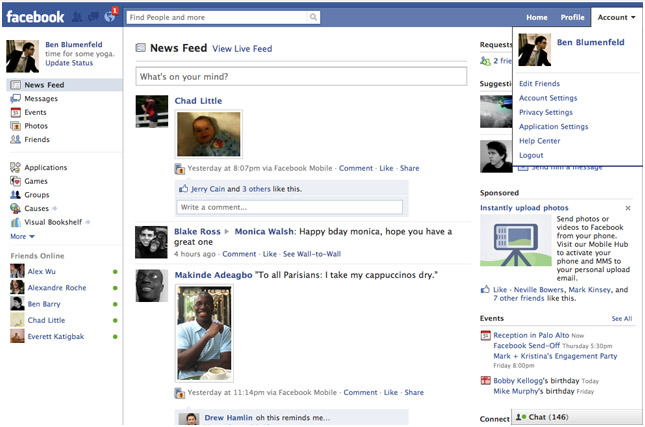
On Friday Facebook received a facelift; what else is new, right?! It feels like the Facebook devs are constantly updating the site’s user interface. Though having to re-learn how to navigate the site every few months is an annoying task, you have to remember it’s all being done to make the experience more streamlined and faster to get around. So what does this latest redesign bring with it? The Top Menu is the area where you’ll find your newest notifications, friend requests, and inbox messages in drop-down menu form. The Left Menu brings together Messages, Events, Photos, and Friends all in one space. An extension of your Friends List is also found here; it lists the people you chat with most and can be expanded to its usual spot in the bottom right-hand corner. There have also been updates to the Applications and Games dashboards, making it easier to discover and play new apps. The center of the page prominently features your News Feed. All in all, since the redesign only affected the home page (your profile and friend’s profiles look and function the same) there isn’t much to re-learn. In fact, I find the new look freshing and definitely a step up from their recent upgrades. But that’s what it’s all about, right? (Side note: This redesign comes on the heels of Facebook’s 6th birthday.)

Twitter’s update is not as drastic but it still brings a few welcome features. Hovercards give users a new way to access profile information without having to leave the homepage to visit someone else’s profile page. Twitter Spokesperson Jenna Sampson explains: “Hovercards are cards which appear when you hover over a username or avatar. The cards display additional information about the person and allow you to interact with them while staying within the context of your page.” Hovercards reveal the person’s name, profile information, location, and whether or not you follow the person. You also get an options panel with follow, block, mention, or report buttons. Less clicks and page redirections are the result. A welcome update indeed. Twitter is also giving users the ability to narrow the range of the Trending Topics list. Instead of being forced into watching worldwide trending news, users can specify their country or US city. They are currently working on adding more locations to the list.
For those of you who have not received the Facebook or Twitter updates yet there’s no need to worry. It takes time for such updates to reach all users. (I was one of the first to receive the Facebook redesign, but I have yet to play around with Hovercards in Twitter.)
[Via FacebookBlog; Mashable]

On April 15, 2010 access to Xbox Live on all original Xbox consoles and games will come to a grinding halt. Microsoft is flipping the switch to the off position, so to speak, so if you own an original Xbox console and/or play Xbox Originals games on the 360 you will no longer be able to access Xbox Live features, ie. multiplayer and achievements. Why is Microsoft doing this, you ask? Xbox Live GM Marc Whitten: “…we need to make changes to the service that are incompatible with our original Xbox v1 games.” In other words, original Xbox content is becoming stale and simply cannot forge its way into the new generation of gaming. If you happen to be living in the past (or still can’t afford an Xbox 360, oh come on!) Microsoft has plans for you: “We will contact the Xbox LIVE members directly impacted by this change and if this includes you, I encourage you to check your LIVE messages and associated e-mail account over the coming weeks for more details and opportunities. We view you as a partner in this process.” All you Halo 2 fanboys better get your multiplayer gaming on before it’s too late! Soon you’ll be stuck with playing Halo 3 and Halo 3: ODST; what a shame!