Category Archives: Technology

Three U.S. Windows Phone 7 devices available today

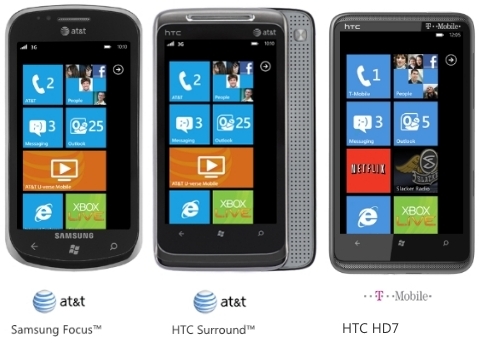
Of the ten Windows Phone 7 launch devices, three of them are making their way into the States today.  AT&T’s got the Samsung Focus and the HTC Surround, and T-Mobile offers the HTC HD7.  All three devices cost $199.99 after signing a 2-year contract, or $500 if you decide to opt out of the contract before purchasing.  Bet you’re wondering about the other two U.S. WP7 phones, both of which include slideout QWERTY keyboard.  AT&T’s LG Quantum is up for preorder now at $199.99, and the Dell Venue Pro is still marked as “coming soon”, though it’s expected to hit stores on 11/17 for $199.99 on contract.  As usual, this space will be updated when the official word hits the streets.

Microsoft’s totally revamped, moderntastic mobile OS has finally arrived people!  Will you be one of the early adopters to give one of the launch handsets a spin?  Brush up with specs and features here.

Droid Pro lands on Verizon Wireless November 18 for $179.99

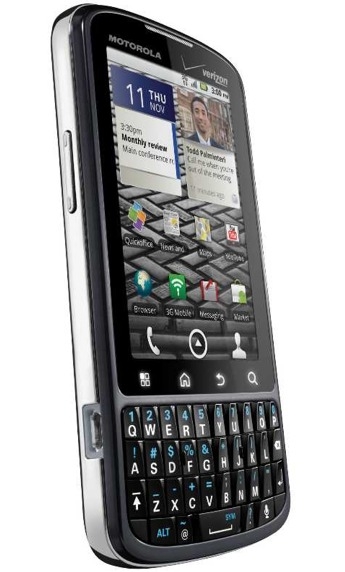
Right on target, Verizon Wireless has spilled the deets regarding the release of “the first Android-based smartphone optimized for business use.”  Droid Pro will be made available for Verizon Wireless customers November 18 for $179.99 after signing a new 2-year contract and sending in a $100 mail-in rebate.  Been salivating at the sight of this Android/Blackberry hybrid handset of sorts since Moto announced it in early October?  Better your odds of picking up the device on launch day by filling out a preorder form at VZW’s website starting tomorrow (11/9).  Full PR after the break.

[Via Engadget] Continue reading Droid Pro lands on Verizon Wireless November 18 for $179.99

Sony intros new Bluetooth headset for PS3 users

What you’re looking at here is the newly redesigned Bluetooth headset for PlayStation 3 users.  It’s glossy, sleek, and 30% more compact than its original counterpart which debuted in 2008.  Hungry for specs?   It offers a dual-microphone design, automatic pairing via USB cable, in-game headset status indicator, an easily accessible microphone mute button, a charging cradle which also functions as a desktop microphone, a special High Quality mode that promises “crystal clear voice chat” during gaming sessions, and built-in noise cancellation.  It also packs three-way calling and call waiting support if you feel like pairing it with a mobile phone; its got six hours of talk time, so it’s definitely a viable cell phone companion.  All this can be yours for the same price of the original model–$49.99.  It will release sometime this month.

[Via PlayStationBlog]

Dell Inspiron Duo shows up in official teaser

Ya’ll remember when Dell unveiled the Inspiron Duo back in September at IDF?  You know, it’s the netbook/tablet hybrid that sports an awesome (albiet unconventional) swivel design.  We’ve seen it pose for press shots and star in brief hands-on demonstrations, but there’s nothing like watching it shine in an official teaser video from Dell.  Watch the Duo in convertible action above, then watch it again!  Latest murmurs point to a late 2010 release date.

[Via Engadget]

Hulu Plus preview opens up to everyone, now available on 2010 Sony BRAVIA TVs, coming next week to all PS3 users

Hulu is ready to take its premium subscription service to the next level by opening it up to more people.  As of today you no longer need an invitation to subscribe to Hulu Plus; if you’re interested, go ahead and register for the service right now.  Is your living room packed with Sony products?  If so this next bit of news should crack a smile.  Hulu Plus is now available to access on 2010 BRAVIA HDTVs and BRAVIA Internet Video Link via the BRAVIA Internet Video platform.  It will “soon” be available on Blu-ray players, Blu-ray Home Theater Systems, Network Media Player, and Sony’s DASH.  PS3 owners, listen here: Hulu Plus will open for all of you sometime next week. (Update (11/10): It’s available today.)  Since July only those PS3 users who subscribed to PlayStation Plus (a $50/year service) could use Hulu Plus, but now Hulu is removing that road block and allowing all PS3 users with a (free) PSN account to sign up for their service.  PS3 will remain the exclusive video games console with Hulu Plus access through the remainder of the year; it’s expected to land on Xbox 360 and Wii sometime in 2011.  PR messages from Sony and Hulu sit after the break.

[Via PlayStationBlog; HuluBlog; Engadget] Continue reading Hulu Plus preview opens up to everyone, now available on 2010 Sony BRAVIA TVs, coming next week to all PS3 users

Google Instant makes its way to mobile devices

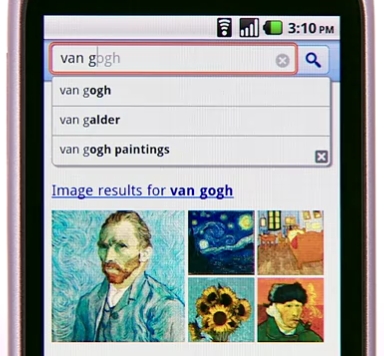
Today Google made good on their promise bringing the power of Google Instant search to the mobile space.  When you access Google.com and begin to type your query, the search bar snaps to the top of the screen and Instant does its thing.  The new functionality works over 3G and WiFi connections, but Google gives you the option to turn it off during those slow surfing times.  There’s a turn on/turn off button located beneath the search bar on the home page for easy access.

Instant for mobile is currently in beta, and it’s available for iPhone and iPod (running iOS4) and Android (running 2.2 Froyo) users in the U.S.  Additional country, language, and device support is in the works.  Look after the break to watch a brief demonstration.

[Via GoogleBlog] Continue reading Google Instant makes its way to mobile devices

Oh, oh it’s magic: Watch the iPhone OS run on a 58-inch multitouch table

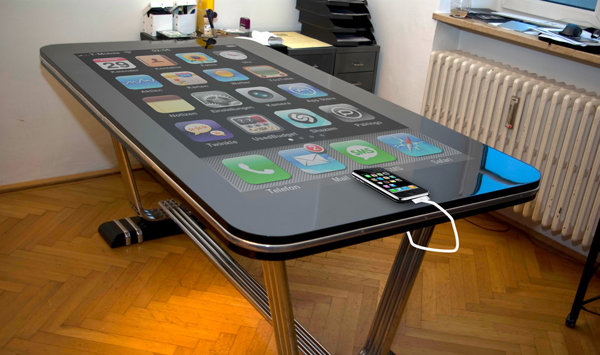
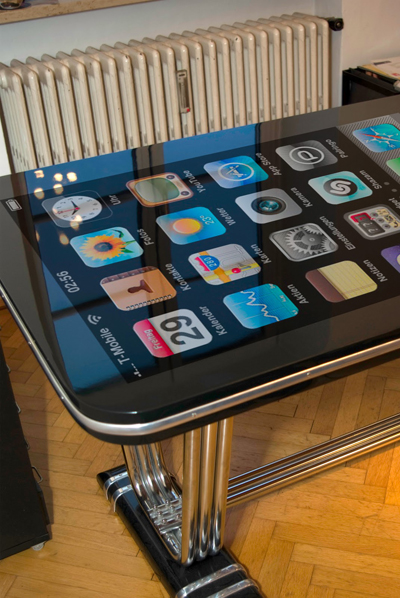
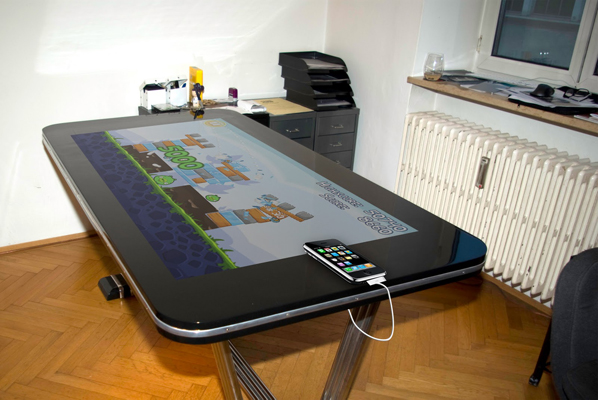
A group of tinkerers have devised a way to hook up an iPhone 4 to a large multitouch surface to display and interact with the device’s interface like you’ve never seen before.  Making “Table Connect for iPhone” work is super simple.  All you need is a jailbroken iPhone 4 running a dedicated app, a 30-pin dock connector cable, and of course that gorgeous 58-inch multitouch table.  The iPhone plugs right into the 30-pin connector located at the base of the table and “immediately after it is attached, the magic starts to happen,” says the creators.  Watch said magic unfold in the video above, and look in the gallery below for some mockup stills.  For an alpha firmware the transition appears to be buttery smooth.

[Via TableConnectforiPhone; Engadget]

Facebook announces new features on the mobile front

Today Facebook’s Mark Zuckerburg hosted a “mobile event” at Facebook HQ in California.  Almost immediately Zuckerberg shot down rumors of a Facebook cell phone–rats!  What they really called the press event for was to express their interest in “making mobile more social.”  Let’s breakdown the new Facebook app enhancements.

(1) Single sign on. This makes logging into your FB account in multiple apps a snap, as long as the developer incorporates the FB single sign on API inside their app.  Here’s how it works: Once you log into the FB app on your phone, you can then log in to any other app that supports single sign on without typing in your username and password.  No more tedious typing, no more worrying about forgetting your password.  The following Android apps support single sign on today: Flixster, Groupon, Loopt, SCVNGR, Yelp, and Zynga Poker.  These updated apps will make their way to the iPhone “soon.”  And loads more are on the way.  (video demonstration)

(2) Location APIs. This one is directed towards the developer community, but it will result in significant upgrades for users.  Today Facebook has opened up all three location APIs for developers: read where your friends are; write and publish check-ins; search for relevant places.  Up until now, mobile users could only see in the news feed people checking into locations using Places only.  Now that developers have access to the location APIs, they can make their apps support Facebook location notifications.  For example, now you can check into a location using Foursquare, Loopt, or Yelp (and many others) and this information will show up on your mobile and desktop news feed.  In other words, Places can now be integrated into third party apps so users can see and interact with their FB friends within other apps.

(3) Deals platform. Facebook has teamed up with many local businesses to provide users with a new “deals platform.”  Here’s how it works.  With Places users can sign in to locations (ie. a restuarant) and share where you are with friends and see which of your friends might be nearby.  The updated version of Places incorporates deals notifications.  Local business will be able to offer users deals when you check in to their place using FB on your phone.  Now when you search for nearby places a yellow icon will appear next to those places that are offering deals.  Click the yellow icon to view the deal, check in to Places to claim it, and then show it to the cashier to receive your discount.  Note that these deals run on the merchant side, not Facebook.  There are four type of deals: “individual deals for a discount, free merchandise or other reward; friend deals where you and your friends claim an offer together; loyalty deals for being a frequent visitor to a place; and charity deals where businesses pledge to donate to a cause when you check in.  Business like Chipotle, Gap, and McDonald’s are already supporting the deals platform.  Click here to view the current list supporters.  Deals works on the Facebook for iPhone app and at touch.facebook.com on other mobile devices.  (video demonstration)

In addition to these three major announcements, Zuckerberg also set aside time to discuss software updates to the Android and iPhone version of the Facebook app.  The Android 1.4 update brings Places and Groups to the app and a refresh to the notifications application.  Facebook says, “Clicking on a notification now won’t send you off to the browser.  Instead, as long as that notification has an appropriate destination within the application itself, you will be taken there.”  Score!  The iPhone 3.3 update brings Deals and Groups to the app, along with a starred friends list in Places and a new Photos composer.  Both free updates are available to download right now.

[Via FacebookBlog, here & here]
Flash comes to iPhone in Skyfire browser [Update: sold out?; Update 2: it’s back]

Somehow, someway Skyfire has managed to clear its mobile Skyfire browser–Flash support and all–through the Apple gates and into the App Store.  As detailed in early September, Skyfire does not actually run Flash video; instead it trancodes the content using Skyfire’s servers from Flash to HTML5.  So if you’ve been looking for a Flash fix on your iOS device here’s your $3 solution.

Note: The Webkit-based browser will not support all Internet Flash content; for example, Flash games and apps are not supported, and Hulu content is blocked.  Skyfire promises that “scores of other premium sites are supported”, so stay hopeful!  Look after the break for an updated video demonstration.

Update: An app can’t be “sold out”, can it?  According to Skyfire: “The user experience was performing well for the first few hours, but as the surge continued, the peak load on our servers and bandwidth caused the video experience to degrade.  Thus we are effectively ‘sold out’ and will temporarily not accept new purchases from the App Store.  We are working really hard to increase capacity and will be accepting new purchases from the App Store as soon as we can support it.”  Ah, that explains it.  Keep tabs on their Facebook and Twitter accounts for updates on the matter.

Update 2 (11/5): In a short blog post Skyfire CEO Jeff Glueck assures iOS users that “we’re working around the clock to add capacity for more users.”  And here are the specifics: “We are going to open batches of downloads for new users over the coming days. The first batch will be in a few minutes on the Apple App Store. It will be first come, first serve.”  The first batches are coming to the US only, “with additional country support to follow shortly.”

[Via Engadget] Continue reading Flash comes to iPhone in Skyfire browser [Update: sold out?; Update 2: it’s back]

Math teacher deserves some kind of award for this.

Professor Matt Weathers, who teaches a Nature of Math course at Biola University, played an intricately planned trick on his students to celebrate Halloween.  Using the magic of pre-recorded video projections mixed with live action, Professor Weathers pulled off the coolest in-class experiment I’ve ever seen.  Teacher of the year award goes to Weathers!  Look after the break to watch what he did for last year’s Halloween class, and head over to his YouTube channel (coolest teacher ever?) to watch a tutorial and discover the magic behind trick.

[Via Gizmodo; TheDailyWhat] Continue reading Math teacher deserves some kind of award for this.

The Fall 2010 Xbox 360 Dashboard update has arrived

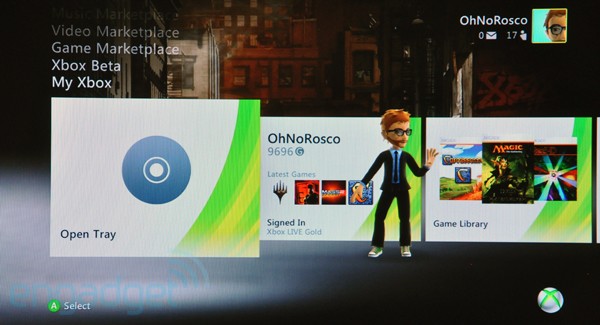
Today Microsoft rolled out the latest Xbox 360 Dashboard update.  It brings with it a whole new look (the UI is much more streamlined and flat), new navigation fonts and sounds, and many more aesthetic changes.  But that’s not even the best part.  Additionaly the update enables the ESPN hub previewed at E3 , Zune Music, Netflix search, and new family settings and family programming.  Last but not least, the update makes your console Kinect ready; the motion camera accessory releases in just 3 days!  How do you get the update?  Simple.  When you turn on your Xbox and attempt to connect to Xbox Live, you will automatically be promted to download and install the update.  Note that the update is mandatory if you ever want to connect up to Live again.  Hit up Major Nelson’s website to read about the new features in more detail, and power up your Xbox and start exploring.

[Via MajorNelson; image via Engadget]

320GB PlayStation 3 is Move-less

Want a 320GB PlayStation 3 console but don’t care for the PlayStation Move motion accessory?  Sony’s got you covered.  Earlier this week the makers of PS3 introduced a new SKU into the market.  For $349.99 you get the 320GB PS3 console (the largest storage capacity next-gen console) and a DualShock 3 controller.  This new standalone PS3 model is available today.  But before you decide to make a decision at the counter, take into consideration your other options.  (1) For $50 less you can get the 160GB PS3; (2) for $50 more you can get the 320GB PS3 w/ Move bundle (which includes one Move controller and Sports Champion game).  Don’t need the large capacity?  Absolutely sure you don’t want to get off the couch and interact with games in a new way?  Ultimately, the choice is yours.

[Via PlayStationBlog]