Rapper Consequence talks up G.O.O.D. Music Day

September 14 is the expected release for four big albums that are signed under Kanye West’s G.O.O.D. Music label: Big Sean’s debut album Finally Famous, Kanye West’s Good Ass Job, Kid Cudi’s Man On the Moon II: The Legend of Mr. Rager, and Consequence’s ConsTV.  In an interview with HipHopDX, rapper Consequence was asked about the supposed G.O.O.D. Music Day.  Read the excerpt from said interview below.

DX: So on September 14th you, Kanye West, Kid Cudi, and Big Sean are all droppin’ your respective projects. But just to play devil’s advocate, you sure you wanna do that? It’s hard enough getting folks to cop one album let alone four albums on the same day.

Consequence: Well…the idea for doing the G.O.O.D Music Day emerged between me and Sylvia Rhone, just to be quite honest. I’m very communicative with Sylvia Rhone on everything that I do. We had actually met with Kanye one night, and as me and her left the meeting, we left together and I was like, “Yo, we need to really get this paper right now.”

When we left we thought that this is where we need to take advantage of the situation. So…she got on the phone…made some boss calls, and then we got to it. At the time when [Big] Sean announced that [he was also dropping his album on September 14th] I didn’t know that he was in the mix of that, but it’s all good.

But initially, how that shit came about was me, Kanye and Kid Cudi. I just hadn’t announced it because I know we had things that had to be ironed out. And it got ironed out where it’s – ‘Cause actually at the end of the day, Kanye being the head of G.O.O.D Music had to approve that. And the approval was based on, “Let’s shake the game up.” Cudi got the kids, Cons got the streets, ‘Ye got the globe, so we all gon’ eat. [Laughs] (Added emphasis.)

With Tony Williams’ King or The Fool and John Legend’s Wake Up (produced by The Roots) expected to drop on or around the 9/14 date too, Sepember might just be the greatest month for music in 2010.  Yeah, I went there.

[Via HipHopDX; DatNewCudi]

Robot responds to “beer me” phrase by–you guessed it–fetching you a beer

The hacker boys of Willow Garage put their minds together to make the coolest robot ever–one that can fetch and serve you beer.  The PR2 robot responds to a web application called Beer Me.  Let’s come up with a situation… It’s the Super Bowl and you and the fellas want a batch of fresh cold beers from the back fridge.  You, the host of the party, will hop onto the nearest computer and run the Beer Me web app.  In it you can access a pull-down menu and specify the exact type of beer everyone wants.  Once the order is set, clicking the Beer Me button will activate the PR2 robot to fetch the beers for you.  The robot will navigate your house, identify the fridge, open its door, scan the racks for the beer, grab and place the beers onto a four-holed foam block (that’s located behind the robot’s base navigation laser), close the fridge door, and report back to you with the drinks.  (Note: If your type of beer is out of stock, the robot will notify the web app so you know to make a beer run.)  Now it’s time for the handoff.  The robot uses facial recognition to detect when a face is in close proximity so that beers are not dropped; in fact, PR2 will not let go of its death grip on the bottle until a face is detected.  After you take your drink, the robot will whip out a bottle opener; you have the option to take it to open the beer yourself, or the robot can do it for you.  Mind blown yet?  See it all happen in the “OMG”-inducing video above.  I want one.

[Via Engadget; WillowGarage]

Digital eyedropper “slurps” data from computer to computer, computer to speakers (incredible!)

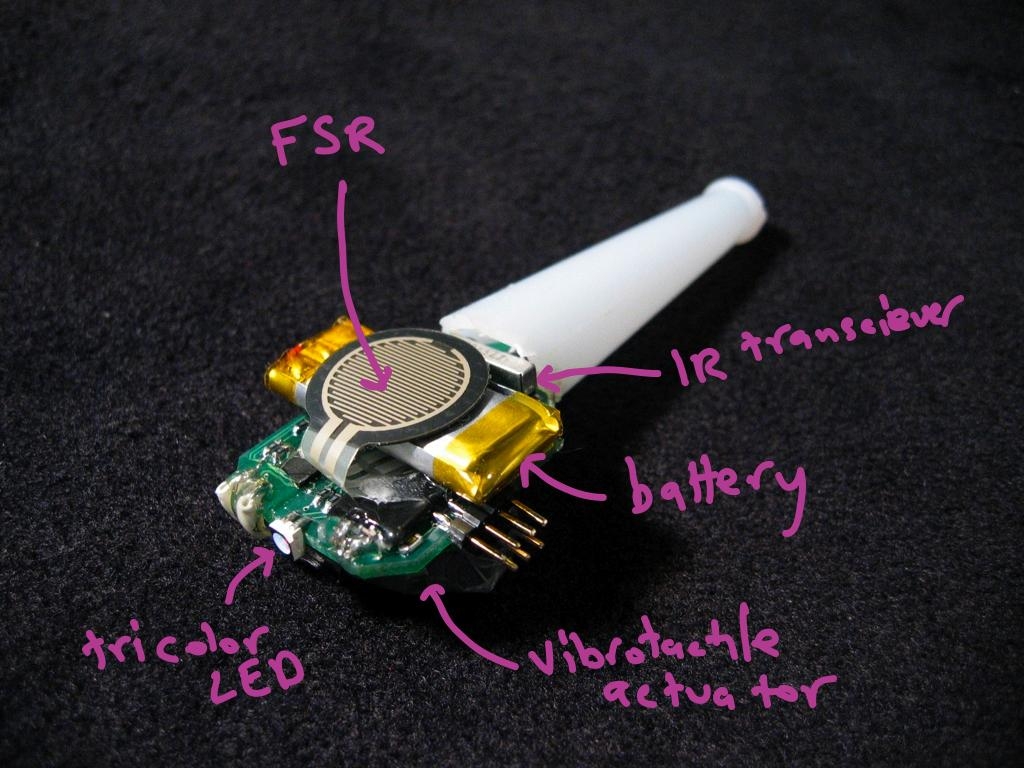
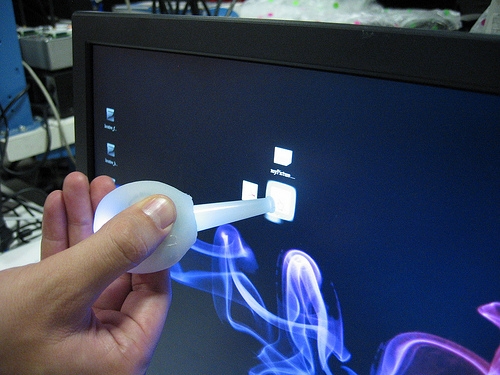
MIT Lab’s Jamie Zigelbaum, Adam Kumpf, Alejandro Vazquez, and Hiroshi Ishii have come up with one of the most brilliant ideas I have ever seen.  It’s one of those things you dream about or see in movies and think this will never exist in real life.  Well it’s real alright, it’s called Slurp, and it works like this:

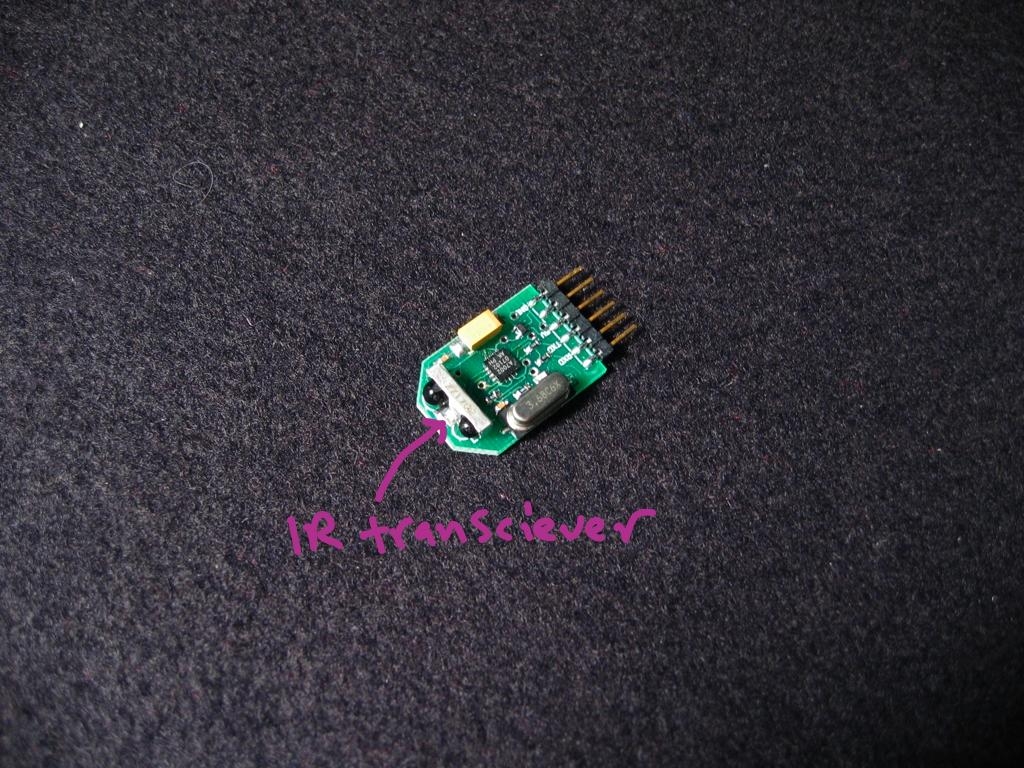
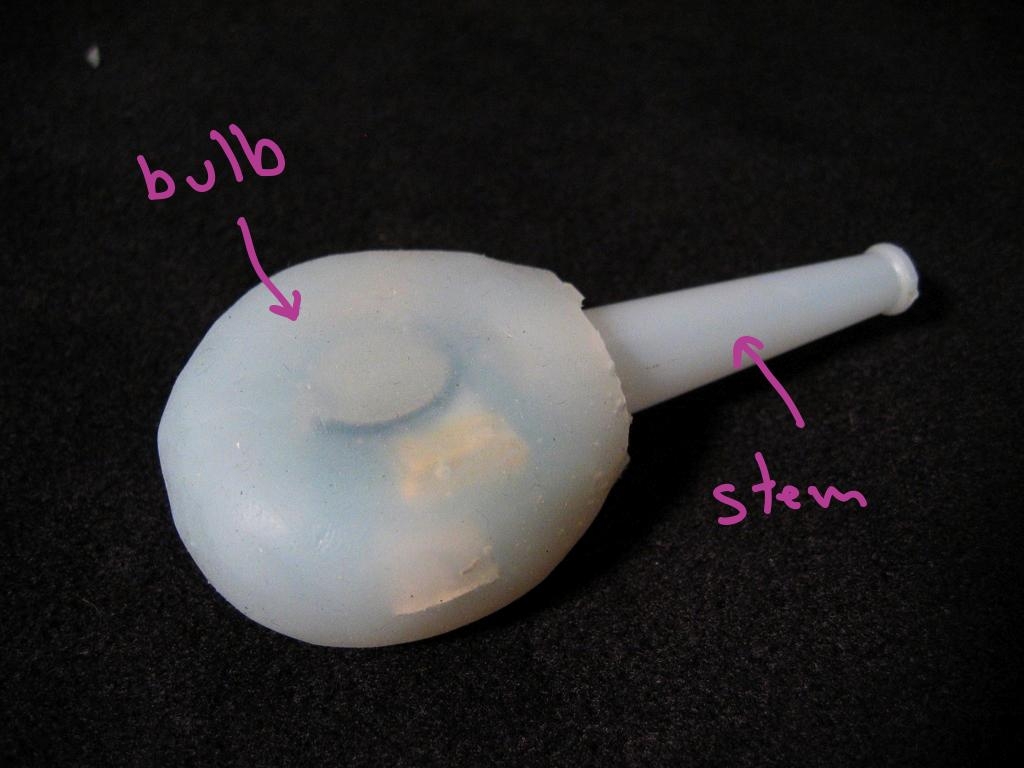
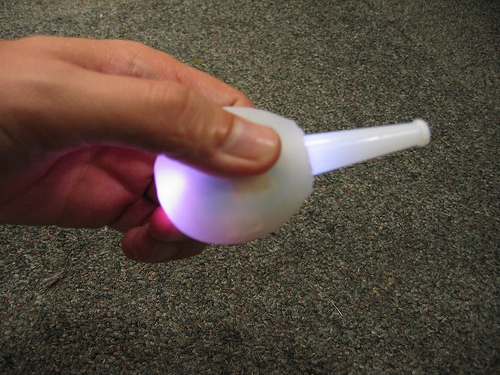
Slurp is tangible interface for manipulating abstract digital information as if it were water. Taking the form of an eyedropper, Slurp can extract (slurp up) and inject (squirt out) pointers to digital objects. We have created Slurp to explore the use of physical metaphor, feedback, and affordances in tangible interface design when working with abstract digital media types. Our goal is to privilege spatial relationships between devices and people while providing new physical manipulation techniques for ubiquitous computing environments.

You’ve got to see it to believe it, so go ahead and watch the too brief a demo in the video above.  Do you see that??  You can point an eyedropper at your computer screen, suck up specific data (like a folder), and spit it onto another computer.  Sure, it works similarly to transferring files to and from a PC with a USB thumb drive, but where’s the fun and magic in that?  And here’s something a USB drive can’t do: suck up an MP3 and spit it into a set of speakers and get instant feedback!  It also vibrates and displays light to indicate its current state of use.  Are you super interested in learning more about Slurp?  Look after the break to watch two more videos; one is another short demonstration and the other is ten minute presentation that details the magical eyedropper.  Check out the gallery below for a closer look at it.

[Via Engadget; MIT]

The Invisible Mouse

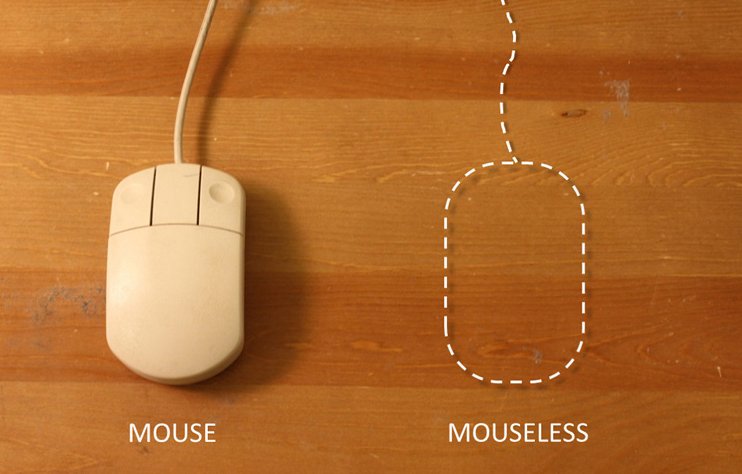
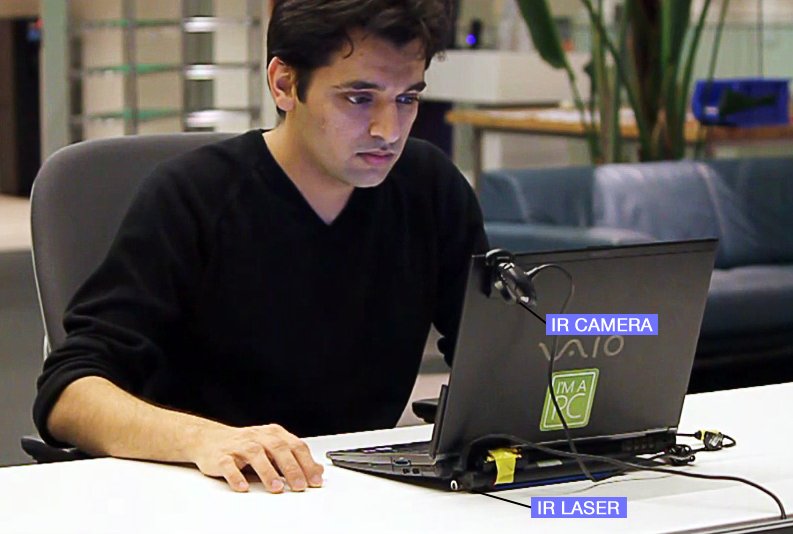
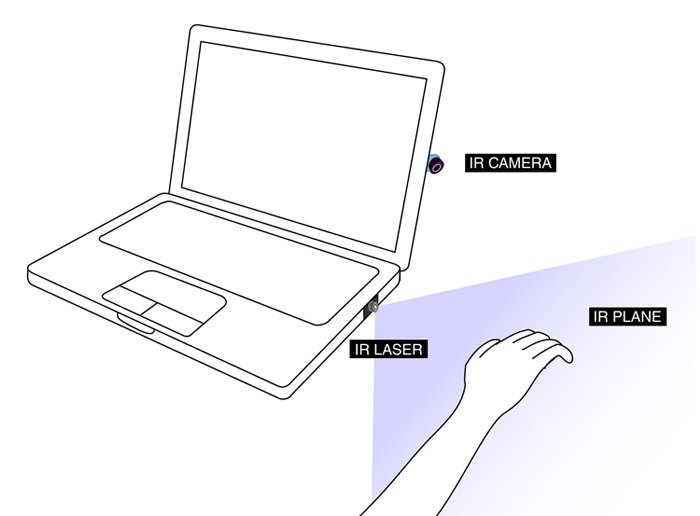
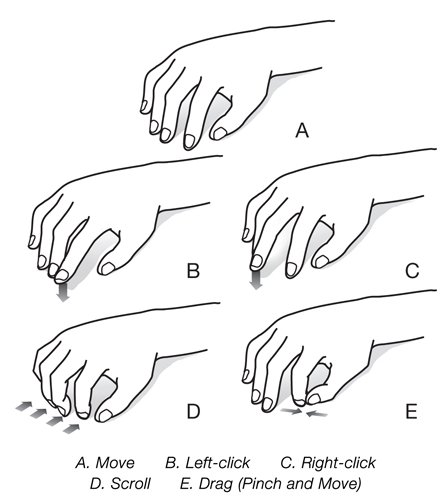
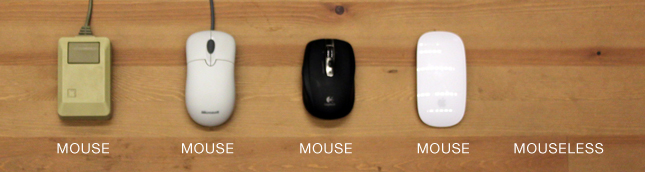
Pranav Mistry of MIT Media Lab has invented an invisible mouse he calls “Mouseless.”  By combining an infrared (IR) laser beam and an IR camera inside the side of a laptop, software can detect and track your hand movement atop of a flat surface and convert it into on-screen mouse movement, left/right clicks, and pinch/scroll gestures.  Want to get a bit more technical?

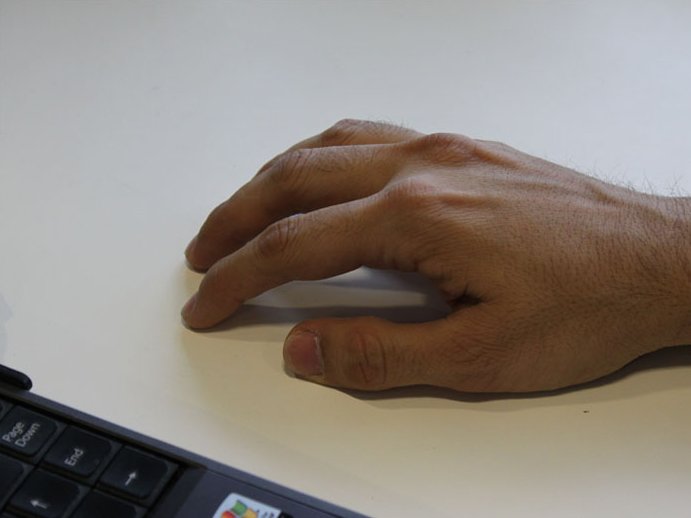
The laser beam module is modified with a line cap and placed such that it creates a plane of IR laser just above the surface the computer sits on. The user cups their hand, as if a physical mouse was present underneath, and the laser beam lights up the hand which is in contact with the surface. The IR camera detects those bright IR blobs using computer vision. The change in the position and arrangements of these blobs are interpreted as mouse cursor movement and mouse clicks. As the user moves their hand the cursor on screen moves accordingly. When the user taps their index finger, the size of the blob changes and the camera recognizes the intended mouse click.

It’s pretty incredible.  The protoype costs a mere $20, so if this technology were to be picked up by a major manufacturer I’m sure it would be a simple addition.   See it in action in the video above.  And check out some relevant stills in the gallery below.

[Via Gizmodo; YouTube; pranavmistry]

Bina48 is an advanced humanoid robot with OK conversation skills

Meet Bina48.  She’s It’s a body-less robot that manages to exhibit some compelling advancements that will surely lead to Judgement Day, but also reassures us that J-Day isn’t coming anytime soon.  Bina48 was created by David Hanson of Hanson Robotics and it’s based on a real life person named Bina Rothblatt.  Though the robot is pretty adept at answering simple questions (like any chatbot it can scour the Internet for relevant information), what’s most exciting (and rather frightening) is it’s eye movement and facial expressions and reactions.  It seemed distracted when the NYT reporter asked it questions, but when the answers did come I was impressed.  Watch the robot-human conversation go down in the video above.  And let’s all pray to our respective saviors that Moore’s law doesn’t apply to humanoid robotics.  Ah crap it does.

[Via NYT; Engadget]

BlackBerry pushes out (another) sneak peek at 6

Today BlackBerry posted a new video on YouTube that gives us another glimpse into their latest mobile operating system called BlackBerry 6.  New features like social network integration (with Social Feeds that support simultaneous postings on sites like Facebook and Twitter), universal search, an enhanced media interface, and the brand new WebKit-based browser (with pinch/zoom functionality) are teased in the breif video embedded above.  It all looks pretty great BlackBerry, but I want to see it in action on a sleek, new Blackberry device.  Let’s release this thing already!  Oh, and as Engadget points out, it’s worth nothing that the first two sneak peek videos of BB 6 feature a UI that’s make specifically for a full touchscreen device.  One wonders how BlackBerry intends to morph the new touch-friendly UI into one that’ll work on a smaller device that sports a physical keyboard–the very form factor that the company is so famous for.

[Via Engadget]

Consumer Reports says they “can’t recommend the iPhone 4” due to the antenna problem

Today Consumer Reports updated their original review of the iPhone 4 after properly testing the device’s antenna.  In their original review, CR recommended the iPhone 4: “The iPhone scored high, in part because it sports the sharpest display and best video camera we’ve seen on any phone…”  They go on to praise the improved battery life, front-facing camera, and built-in gyroscope.  During their time with the initial review test unit, they were “unable to replicate the [antenna] problems” that so many other iPhone owners seemed to be complaining about.  For some reason or another, CR decided to bring the iPhone 4 into their labs to test the antenna problem head-on.  (Why they didn’t do this in the first place is beyond me.)  Their findings:

When your finger or hand touches a spot on the phone’s lower left side—an easy thing, especially for lefties—the signal can significantly degrade enough to cause you to lose your connection altogether if you’re in an area with a weak signal. Due to this problem, we can’t recommend the iPhone 4.

The tests were conducted inside a radio frequency isolation chamber, a room “which is impervious to outside radio signals.”  After connecting “the phones to our base-station emulator, a device that simulates carrier cell towers” they concluded that all of their iPhone models were affected with the antenna problem.  They also tested other AT&T smartphones (namely the iPhone 3G and Palm Pre) and “none of those phones had the signal-loss problems of the iPhone 4.”  Boom.

CR goes on to say that these tests call into question Apple’s forthcoming software quick update which promises to fix the way the signal bars are displayed on the phone.  After coming to this conclusion, they hint that the antenna problem is almost certainly a hardware issue, and a software update and blaming AT&T’s less than stellar network will not pave a way out of this sticky situation.  Speaking of sticky, CR recommends that those affected with the antenna problem can remedy it by applying a small piece of duct tape over the antenna gap.  Not only does this make the phone look downright ugly, it’s going to leave sticky residue and you just don’t want that on your hands (and mind).  Go out and get a bumper case if you can’t manage to hold your phone differently.  CR parts with these glum words: “Apple needs to come up with a permanent—and free—fix for the antenna problem before we can recommend the iPhone 4.”  If the antenna problem is truly hardware-based (and it’s really starting to seem like it is), Apple needs to come out of hiding, admit their design flaw, fix it interally, and offer those affected with a free swap-out of updated models.  Like stat.

[Via Consumer Reports]

Ridley Scott invites you to become part of history in ‘Life in a Day’ film project

Every day, 6.7 billion people view the world through their own unique lens. Imagine if there was a way to collect all of these perspectives, to aggregate and mold them into the cohesive story of a single day on earth.

Life in a Day, a YouTube compilation video to be largely edited by Oscar-winning director Kevin Macdonald (The Last King of Scotland) and executive produced by director Ridley Scott (Gladiator, Blade Runner), will attempt to tell such a story.  It’s being hailed as a “historic cinematic experiment” that relies on you (yes, you) to contribute to the short film.  If you want to participate in the effort, all you have to is capture events that happen in your own life on July 24 and upload your video to the Life in a Day channel by July 31.  Here are some suggestions from Google: “You can film the ordinary — a sunrise, the commute to work, a neighborhood soccer match, or the extraordinary — a baby’s first steps, your reaction to the passing of a loved one, or even a marriage.”  Head over to the channel for other ideas that may inspire you.  So here’s the deal: If your footage is selected to be put into the film, you’ll be credited as co-director and if you’re lucky you’ll get to attend the premiere at the 2011 Sundance Film Festival with 19 others.  If you don’t make the final cut, Google reminds you that your submitted footage will live forever on the channel “as a time capsule that will tell future generations what it was like to be alive on July 24, 2010.”  Sappy, but it’s true!  It’s so easy to do these days, you might as well give it a shot.  On the 24th, whip out your Flip cam and take your dog for a walk.  Who knows, maybe you and Scrappy will make it big.  Need some words of encouragement?  Look after the break for a pep talk from Ridley Scott; the Nike shout-out aside, it should get some creative juices flowing.

[Via YouTubeBlog] Continue reading Ridley Scott invites you to become part of history in ‘Life in a Day’ film project

YouTube intros Leanback; supports 4K video; updates mobile site

Over the course of the last few days Google made a number of exciting announcements concerning its popular video site YouTube.  Read on for all the juicy details.  And make sure to peek after the break where you’ll find two brief videos that outline Leanback and YouTube Mobile with the help of visuals.

YouTube Leanback: Leanback is a new way to watch videos on YouTube.  It makes the whole experience of watching Internet video feel more like you’re watching television.  Here’s how.  When you head over to  www.youtube.com/leanback, you are asked to login to your YouTube account.  Once that’s done, you enter the Leanback portal which instantly promotes minimalism.  A video instantly begins to play from a folder called “Your Feed.”  The videos found in this group are all based on your YouTube account settings, preferences, subscriptions, and previously watched videos.  And if you happen to have your YouTube account connected to your Facebook account, videos your friends are watching and sharing will find a home there too.  In addition to “Your Feed”, you can also browse all of the popular YouTube categories that include Comedy, Education, Entertainment, Music, News & Politics, and more.  If you have any uploaded videos in your account, they will show up at the end of this list.  Videos will automatically stream at their highest quality (HD if available).  Everything in Leanback is controlled with the four arrow keys, the space bar, and the enter button on your keyboard.  For now, mouse control is not supported.  The lowest level of the UI is the content categories I just described.  If you click the up arrow, the usual playback controls pop up (play/pause, rewind/fast-forward, previous/next).  If you click the up arrow once more, a search bar appears.  When you search a term, all related content will show up in its own folder next to “Your Feed” down below.  And that’s it, really.  Leanback is all about video playback first, control second.  The concept is neat; login to your account and presto–video (that should be) tailored for you begins to play and you can quickly and easily scrub through it.  Google calls it “effortless viewing.”  So watcha waiting for?  Have at it!

4K video support: Chew on this: “At 4096 x 2304 pixels, 4K is over four times the size of 1080p.”  So if you thought HD was good, you ain’t seen nothin’ yet.  Anyway, now YouTube supports “original video resolution from 360p all the way up to 4K.”  When a 4K video is played, you will have the option to select “original video” to view it at its highest quality.  But don’t get too excited just yet.  You need the proper monitor to view such high grade video; even Google claims that the ideal screen size to view 4K content is 25 feet.  Watching 4K footage also requires extremely fast bandwidth.  Since 4K camcorders and projectors are very expensive they have yet to make it into the mainstream.  But you know what?  I think it’s a great move on Google’s part to start supporting it today in preparation for tomorrow.  Feel free to check out some of the first 4K videos to hit the site.  Just beware of the bandwidth limitations and the fact that you most likely cannot view these videos at their proper resolution just yet.

YouTube Mobile: The mobile version of YouTube (http://m.youtube.com) was launched back in 2007.  Since then, we have become more reliant on cell phones and other portable devices, and users are demanding a more broader YouTube experience when they’re on the go.  That was Google’s cue to revamp the mobile site with updates too appease their most loyal fans.  Let’s run down the most important updates, shall we?  It’s speedier; the user interface incorporates more touch-friendly elements; many features from the .com site have transferred over including search query suggestions, the options to create playlists, and the ability to designate “favorite,” “like” or “unlike” videos; and unlike YouTube apps (ie. iPhone’s YouTube portal), the mobile site will see improvements on a more constant, regular basis.  Click here from your device to check out all the new features and options now available at your fingertips.

[Via YouTubeBlog, here, here & here]   Continue reading YouTube intros Leanback; supports 4K video; updates mobile site

Fring update allows 2-way video calling over 3G with iPhone 4 (and more) [Update: Skype support is gone]

I’m just as surpised as you are when I found out that the boys of Cupertino allowed Fring, a voice/video/IM client app, to update its services to give its users the ability to make video calls over AT&T’s 3G network.  Up until now, iPhone 4 users could make video calls using Apple’s FaceTime feature, and this is restricted to WiFi only and other iPhone 4 users.  With the latest version of Fring, iPhone 4 users have multiple options when it comes to video calling.  They can video chat over WiFi & 3G and with non-iPhone 4 users (it’ll work with any mobile device that carries Fring in its App Store).  And since Fring allows you to connect your Skype account to it, now you can video chat with friends and family from iPhone 4 to a PC/Mac running Skype.  Among other new features, Fring now supports iOS4 multitasking and offers a new “social stream” and a “smarter address book”.  Give it a try now–the updated Fring app is sitting in the App Store for $0.

Some clarification: If you have an iPhone 4, you can use Fring to make video calls with other iPhone 4 users as well as users of other devices.  If the user you are calling is using an HTC EVO 4G, two-way video calling should work just fine since both the iPhone 4 and EVO 4G have front-facing cameras.  If the user you are calling has a phone that does not have a front-facing camera (say, the Droid Incredible), video calling will only work one-way (from iPhone 4 to the Incredible).  Having a front-facing camera is a requirement to send out video; your backside camera will not suffice.  Get it?–got it?–good.

Update: Since the update was pushed out last Thursday, tons of iPhone owners have been testing it and this resulted in “network stress” for Fring’s servers.  For the time being, Fring is “temporarily reducing support to 3rd –party Skype.”  This means that many of your cell phone to PC/Mac audio/video calls mediated by Skype may not go through at this time.  Fring says they’re working on the issue, and they hope the temporary shut down will open up the ether for Fring-to-Fring video calling.

Update 2:  When Fring decided to temporarily pull the Skype service from its app due to “network stress” issues, Skype swiftly insisted that this action was a breach of their API Terms of Use and End User Licence Agreement.  Skype goes on to say that the Fring’s decision to remove Skype functionality “damaged the Skype brand” and reputation.  In a blog post titled “Skype Cowardly Blocks fring“, Fring goes on the defensive and claims that Skype removed itself from the app, while Skype refutes this claim and calls it “untrue.”  Two can play this he said/she said game all day long, but what does this all result in for the end consumer?  No Skype (voice/video) capability with Fring.  And that’s a major disappointment because for that very short period of time, Fring was the only way to make iPhone 4 to PC/Mac video communication.  Blast!  Look after the break for the official statements from both parties involved.

[Via Fring, here, here & here; Skype] Continue reading Fring update allows 2-way video calling over 3G with iPhone 4 (and more) [Update: Skype support is gone]

Stop-motion teardown of iPhone 4 proves it’s beautiful on the inside, too

The fellas at TechRestore are back with a new teardown.  Yup, it’s the iPhone 4.

1784 hi-res photos combine to make a stop-motion expose of the iPhone 4, revealing every detail of construction, from packaging, down to the chips on the logic-board. Set to a custom electronic/glitch soundtrack, with fast paced action, this is no ordinary unboxing and take-apart video!

Well said.  Now watch.

[Via Gizmodo]

Dress made of recycled VHS tapes

Designer Scianca thought long and hard about the right kind of material to use in creating a new dress.  Her eureka moment told her: recycled VHS tapes.  And you know what?  I think it looks downright sexy.  I’m just stuck wondering what movies/home videos she’s wearing.  Look after the break for an additional shot.

[Via Scianca; Gizmodo] Continue reading Dress made of recycled VHS tapes