All posts by Scott Meisner

Phoenix’s Instant Boot loads Windows 7 in 10 ticks

Here we have a Lenovo T400s laptop running a clean version of Windows 7 and Phoenix’s Instant Boot BIOS.  Note: The laptop is not coming out of sleep mode; it is in the off-state at the start of the video.  It “boots in about one second and will get you to the Windows 7 desktop in less than eleven seconds.”  That is speedy!  However, as Gizmodo points out, it must be taken into consideration that this quick boot time is helped by a solid-state hard drive and a bloatware-free copy of Windows with Areo visualizations turned off.

[Via Gizmodo]

Netbooks to run all versions of Windows 7

I hate to use the phrase “all versions” in the a sentence that is about an operating system, but the geniuses at Microsoft leave me no choice.

Windows 7 will come in six different editions: Windows 7 Starter, Home Basic, Home Premium, Professional, Ultimate, and Enterprise.  Of these six editions, four of them will be available to the general public in the US: Starter, Home Premium, Professional, and Ultimate.  (The others were developed for different countries.)  If you would to know “which one is right for you,” take a look at what Microsoft has to say on the decision-making process.

Up until this point Microsoft made it clear that all netbooks would be restricted to the Windows 7 Starter Edition, meaning that all netbooks would be limited to running at most three applications at a time.  That stinks, I know.  Fortunately, though, Microsoft has given it some thought and has decided to remove this restriction from the Starter Edition, andallow netbooks to run any version of Windows 7.  In other words, you can run the dumbed down Starter Edition or you can rock the Ultimate Edition with Areo Peek features and all.  As the release of the new OS dawns upon us (October 22), it looks like Microsoft is trying to do anything and everything to ease the transition from the troubled Vista to what may be its savior, Windows 7.

[Via Engadget]

Microsoft Courier: UI tour, additional details in the rumor mill

In addition to this revealing video picked up at Gizmodo, ZDNet’s Mary Jo-Foley reported on new speculation from a “more verifiable source” that sheds some more light on the still unannounced Microsoft Courier booklet device.  Her source claims that the Courier is currently running on top of the Windows 7 operating system.  However, the consumer will not be able to install Windows 7 apps on the device: Microsoft tablets of the past “failed because the applications were not tailored to a tablet form factor – that is, Word still had toolbars and menus and scollbars. So, a tablet needs to be like an iPhone – a UX that is specific for the form factor.”  The source mentions that the development team at Microsoft is creating this device like they did the Xbox video game console; Microsoft will handle the hardware and software so as to speed up the development process.  The source also says that the Courier is on track for a “mid-2010” release.

Very interesting tidbits of information, yes.  As Apple is currently in the process of manufacturing their own tablet, I am excited to see how all of this will play out.  Will it be the MS Courier vs. the Apple tablet in the near future?  Only time (and potential surfacing FCC filings) will tell.

[Via Gizmodo; ZDNet]

AT&T gives in, MMS on the iPhone for all!

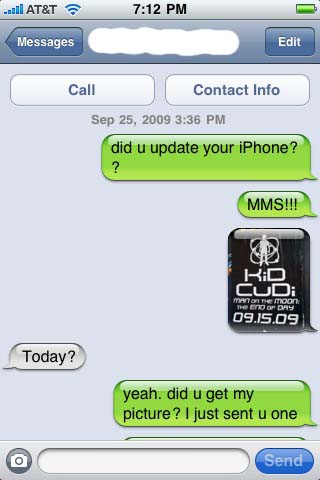
The day has finally come, people.  AT&T has enabled MMS, the ability to send and receive pictures and video, on the iPhone.  (iPhone 3G & 3GS customers only, sorry original iPhone owners.)

The steps to getting MMS running on your iPhone are simple.  First open up iTunes and make sure you are running iTunes 8.2 or later.  Next, connect your iPhone to your PC or Mac.  The update window should pop up automatically after iTunes recognizes the connection.  If it does not, go to the iPhone device tab and select “Check for Update.”  If you have not updated your iPhone to version 3.1 you must do this first.  The actual MMS update is installed via a “carrier settings” update; this means that it is not an iPhone software update, and it should install on the phone within seconds.

[Update Settings Screenshot]

Once you’ve completed the update, disconnect the phone from your computer and RESTART the phone.  The MMS feature will not show up until the phone has been restarted by holding down the power button.  After the phone turns back on, check that the update installed by opening the Messages application and looking for the small camera button next to the text input bar.  It looks like this:

[Text Field Screenshot]

And there you have it.  MMS on the iPhone.  One small step into the 21st century, one giant leap for AT&T.

[Via Apple]

MS creates Windows 7 Launch Party ad; the parody makes it worthwhile

With the release of Windows 7 just around the corner (October 22), Microsoft has created an instructional video about how to make the perfect launch party to celebrate the new operating system.  It is so lame it’s kinda funny.  (Can you say awkward actors interacting in the most awkward of ways?)  It is a six minute video, and you should not watch it in it’s entirety.  However, you should at least scrub through it.  Why, you ask?  YouTube user “cabel” has created a parody of the video, and it is funny, in the inappropriate kind of way.  So funny, in fact, that it makes the effort of the Microsoft advertisers who made the original worthwhile!  Check out the parody video after the break. Continue reading MS creates Windows 7 Launch Party ad; the parody makes it worthwhile

OS boot-up and USB transfer times like you’ve never seen them before–super fast!

This first video shows a Windows 7 PC booting up in under one second.  Phoenix’s Instant Boot BIOS combines with Windows 7’s optimized startup procedure to start up the OS in a very quick manner.  Engadget witnessed “a retrofitted Dell Adamo hit the Windows desktop in 20 seconds, while a Lenovo T400s with a fast SSD got there in under 10.”  Phoenix plans on releasing their Instant Boot software in the near future.

This next video shows the power of SuperSpeed USB 3.0 at work.  USB 3.0 is boatloads faster than current USB modules.  Embedded.com gives an example: “HD TV and movies can be downloaded in seconds, limited only by the storage device’s transfer rate.  A flash drive using USB 3.0 can move 1 Gbyte of data to a host device in 3.3 seconds, compared to 33 seconds with USB 2.0 (according to the USB Implementers’ Forum).”

Imagine this:  You sit down at your computer and hit the power button.  A few seconds later everything is fully loaded and you’re at the desktop.  Your friend gave you a USB thumb drive that contains some MP3 and MOV files you want to transfer to the desktop.  After plugging in your drive to a USB 3.0 compatable module you will be watching movies and listening to music within just a few minutes rather than in a number of hours.  Look out for the Phoneix instant-on software and USB 3.0, coming your way very soon, but not soon enough.

[Via Engadget, here & here; Embedded]

Music video: Drake – “Forever” (Featuring Kanye West, Lil Wayne, & Eminem)

There’s a reason this song made its way to the number one spot on the iTunes chart and still resides in the top ten.  It’s good.  I will point out, though, that some of the featured artists do bring it down some.  Yeezy and Weezy’s verses are weak in comparison to Eminem’s crazy good verse that follows.  It’s worth the listen for the catchy chorus, and even more so for Em’s ingenious rhyme-fest at the end.  Download “Forever” on iTunes here.

[Via KanyeBlog]

Music video: Mr. Hudson – “White Lies”

[vimeo 6733709 625 400]

Adding to his arsenal of songs that include “Supernova,” “Everything is Broken,” and “There Will Be Tears,” British musician and GOOD label artist Mr Hudson invites you to his world of “White Lies” with the freshly released music video embedded above.  His sophomore album Straight No Chaser drops October 6.

[Via KanyeBlog]