Category Archives: Technology

Giant robot arm learns how to flip pancakes

Engineers from the Italian Institute of Technology have taught a robot how to flip pancakes.  There’s nothing more rewarding than laughing at a robot’s failings!

After 50 trials, the robot learns that the first part of the task requires a stiff behavior to throw the pancake in the air, while the second part requires the hand to be compliant in order to catch the pancake without having it bounced off the pan.

[Via Engadget]

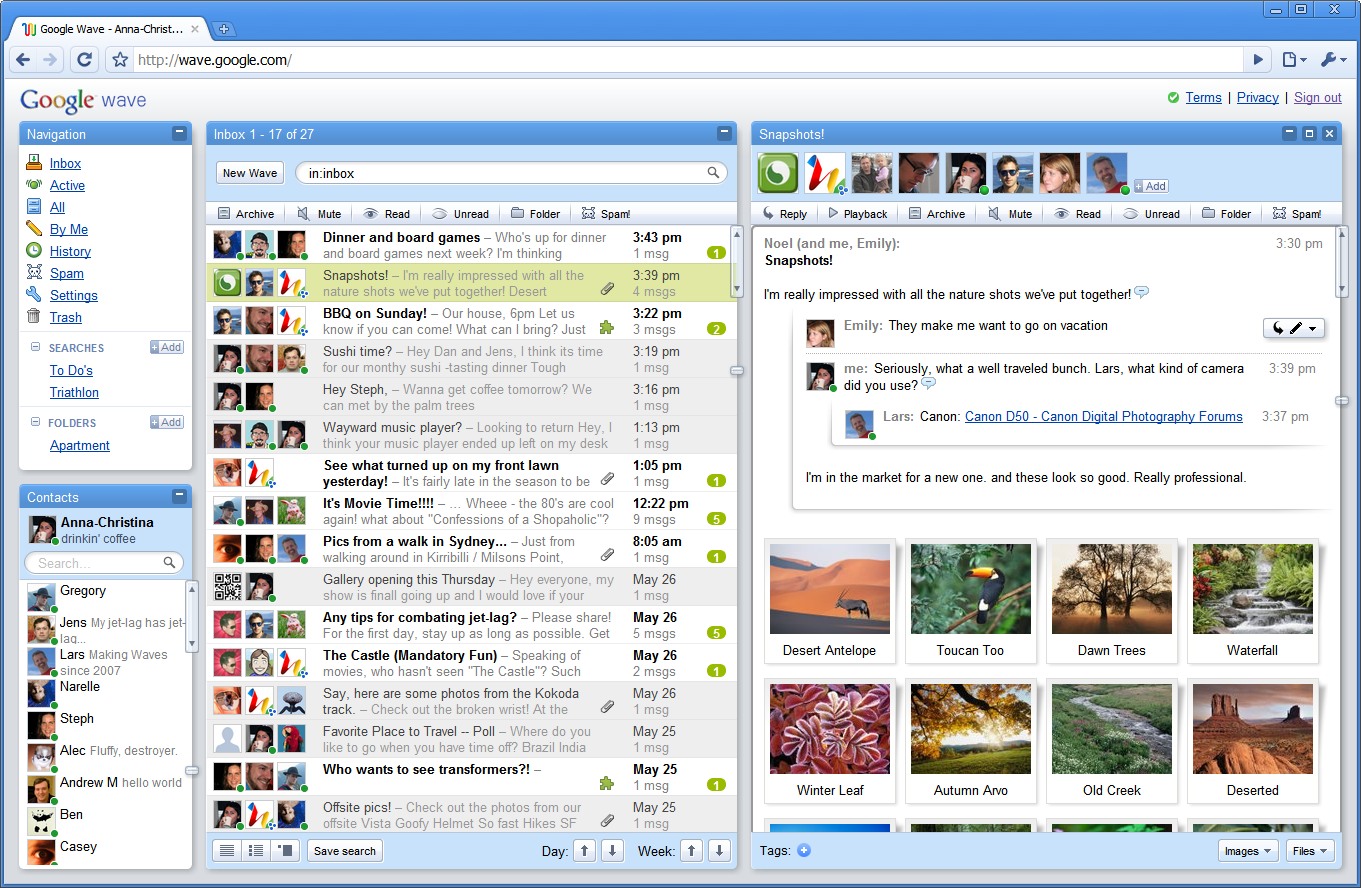
Google Wave standalone dies, its innovative parts live on

Due to a low adoption rate, Google has decided to pull the switch on their “community collaboration” tool called Google Wave.  Wave entered the scene with great intentions.  It boasted such advanced features that a standard web browser had never housed before.  They include character-by-character live typing, the ability to drag-and-drop files from the desktop, sharing images and other media in real time; improving spell-checking by understanding not just an individual word, but also the context of each word, and so on.  Though Wave promised so much, it fell flat in executing all of these things because none of it made sense to an everyday user.  Wave tried to pack too much into a jumbled user interface that was difficult to comprehend from the get-go.  Here were all these new and exciting features, but one could not understand how they all meshed together and why it was so important to learn all of them.  There’s Gmail, Google Calendar, Contacts, etc.  My question is, why did Wave exist at all?  The most appropriate step forward would have been to incorporate Wave’s features into Google’s other respective (and already wildly popular) services.  With news of Wave’s anticipated death, it’s as if my prayers have been answered.  Says Urs Hölzle, Google Senior Vice President:

Wave has not seen the user adoption we would have liked. We don’t plan to continue developing Wave as a standalone product, but we will maintain the site at least through the end of the year and extend the technology for use in other Google projects. The central parts of the code, as well as the protocols that have driven many of Wave’s innovations, like drag-and-drop and character-by-character live typing, are already available as open source, so customers and partners can continue the innovation we began. In addition, we will work on tools so that users can easily “liberate” their content from Wave.

Wave has taught us a lot, and we are proud of the team for the ways in which they have pushed the boundaries of computer science. We are excited about what they will develop next as we continue to create innovations with the potential to advance technology and the wider web.

Google Wave, though your icky UI won’t be missed, the innovations you introduced and cultivated are welcome with open arms into the products we have come to know and use with ease.

[Via GoogleBlog]

Android continues to grow, takes top spot away from RIM in US smartphone market

According to The NPD Group, a market research company, Google’s Android smartphone OS has climbed to the #1 spot for most purchased smartphone OS in the U.S.  In doing so it pushes past RIM’s Blackberry OS and Apple’s iOS 4.  Here’s the official standings for Q2 2010: #1- Android (33%), #2- RIM (28 %), #3- iOS4 (23%).  RIM dropped 9 points since the previous quarter and has not been positioned in second place since 2007.  And if you’re wondering, Android gained 5 points and Apple picked up a single point over the course of the quarter.  The top 5 best-selling Android devices in the second quarter of year are Motorola Droid, HTC Droid Incredible, HTC EVO 4G, HTC Hero, and HTC Droid Eris.  Ross Rubin, executive director of industry analysis for NPD, says that though the recently announced Blackberry 6 will “offer features that have been popular in recently launched Android handsets,” the first crop of supported devices, namely the Blackberry Torch on AT&T, “lacks the large screen allure that has characterized the best selling Android devices at its price point.”  In other words, he is blaming Android’s wild successs on the myriad of Motorola and HTC handsets that feature large screens (ie. Droid & EVO 4G).  And if RIM doesn’t start to change their ways with new innovations (Blackberry 6 fails to impress at first glance), it might be a while until they reclaim their old title as the most selling OS in the hotly competitive smartphone market.  And how ’bout dem U.S. carriers?  #1- Verizon Wireless (33%), #2- AT&T (25%), Sprint (12%), T-Mobile (11%).  Full PR is after the break.

[Via Engadget] Continue reading Android continues to grow, takes top spot away from RIM in US smartphone market

RIM formally details new BlackBerry 6 OS

When Research In Motion (RIM), the makers of BlackBerry smartphones, officially unveiled the latest BlackBerry operating system in late April at WES they failed to properly go into much detail about it.  We were teased with a brief (music) video demonstration and that was about it.  On Tuesday the company finally revealed in full detail the next iteration of its OS dubbed BlackBerry 6.  I’ll run down the most prominent new features.  A newly designed home screen allows for customization and arrangement of icons, contacts, and web page shortcuts; context-sensitive Action Menus allows “users [to] bring the most common actions or tasks of an application to the surface”; a Universal Search tool allows you to search keywords that will ping all the phone’s content, the web, and the new BlackBerry App World; an all-new Webkit browser features tabbed browsing, auto-wrap text zoom, pinch-to-zoom, and supports HTML5 content; Social Feeds integrate access to BlackBerry Messenger, Facebook, Twitter, MySpace, AOL Instant Messenger, Google Talk, Windows Live Messenger, and Yahoo! Messenger applications, allowing you to view all your friends’ actitivies in one space; it also allows you to “post updates across multiple networks simultaneously”.

The new multimedia experience in BB6 packs a really exciting new feature–the ability to sync your music collection over WiFi.  Using BlackBerry Desktop Software 6, you can enable Wi-Fi Music Sync “that allows users to view their entire iTunes or Windows Media Player music libraries from their BlackBerry smartphone, create and edit playlists, as well as select music for download.”  As long as you’re in range of your WiFi signal, playlist edits and song information are automatically synced to the phone.

The OS also includes new camera modes and a Podcasts application that allows you to manage audio and video podcasts.  A dedicated YouTube app is included, too.  All of these new and updated features comprise BlackBerry 6.  Consumers will have the chance to get their hands on it August 26 with the launch of BlackBerry Torch, the first BB to come loaded with the new OS.  According to RIM, BB6 will be ported to the BlackBerry Bold 9700, BlackBerry Bold 9650, and BlackBerry Pearl 3G “subject to carrier certifications in the months ahead.”

Overall BlackBerry 6 is a welcome and much needed refresh to the aging BlackBerry UI.  The most exciting update is the system-wide multi-touch experience.  The Storm and Storm 2 smartphones did pack capacitive touchscreens, but BB6-supported phones will be designed around the multi-touch experience consumers are used to finding in devices like Apple’s iPhone and Motorola’s Droid.  A new Webkit browser will definitely wow users with its speed and future-proof support for HTML5.  The new social networking features also look promising.  As exciting as all of these new additions to the BlackBerry platform may sound, almost all of them have already been implemented in other smartphones for years.  With BB6 RIM is essentially playing catch up with the big players (ie. Apple, Google).  RIM has failed to incorporate that extra pinch of bam that separates itself from the competition.  While BB6 definitely pushes BlackBerry devices closer to the competition in terms of features and aesthetics, it does not give cell phone buyers a definitive reason to choose this OS over another one.  BBM’s sheen can only last so long.

Look after the break for the full PR plus a “sneak peak” video.

[Via Engadget; Gizmodo] Continue reading RIM formally details new BlackBerry 6 OS

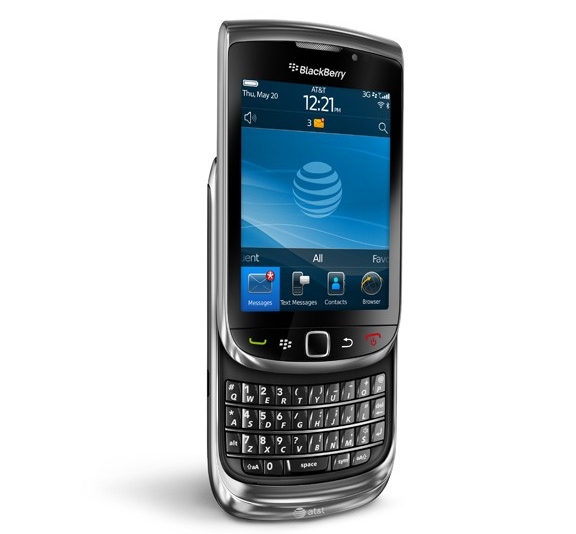
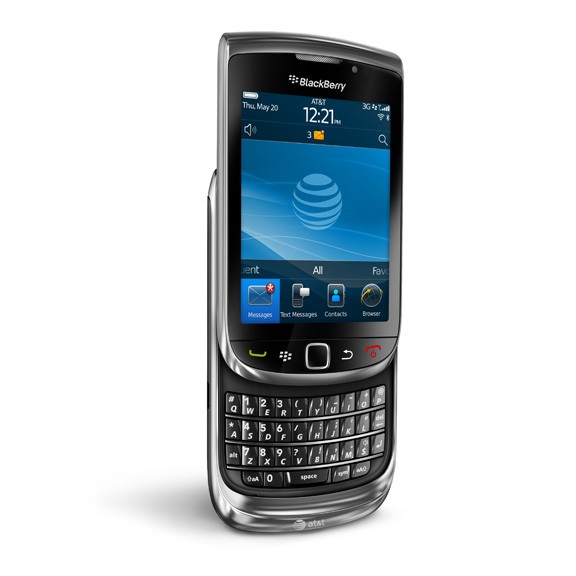
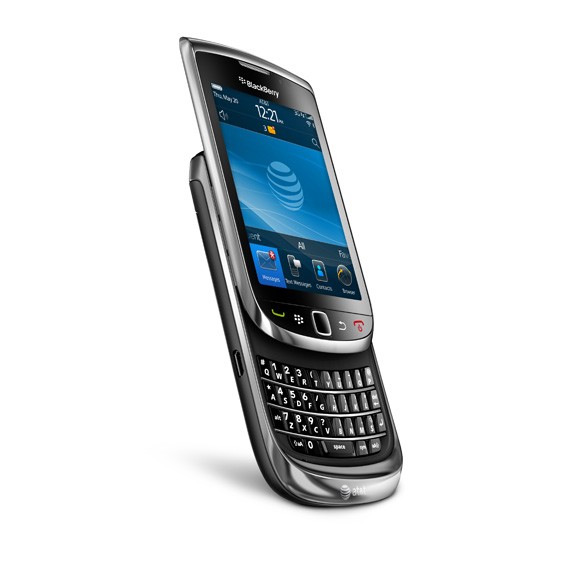
BlackBerry Torch slider QWERTY smartphone runs BlackBerry 6, hits AT&T August 12 for $199.99

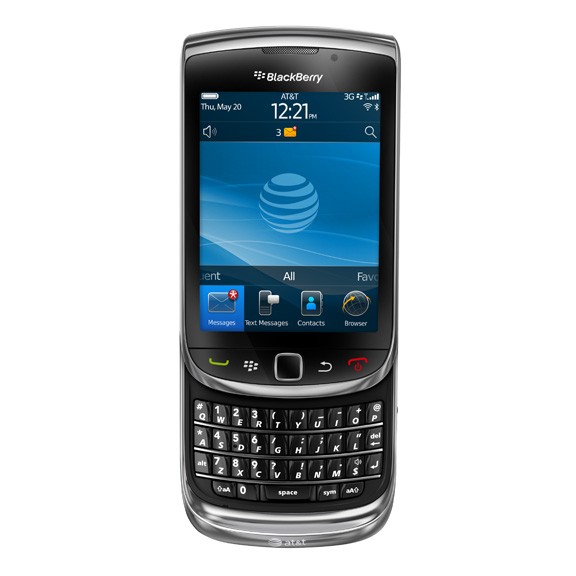
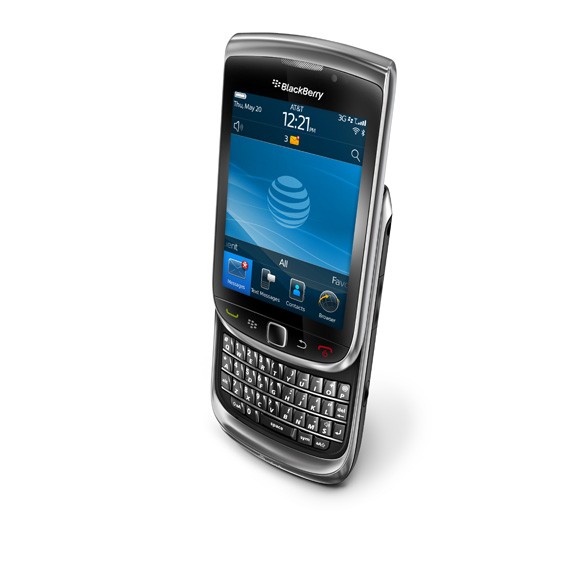
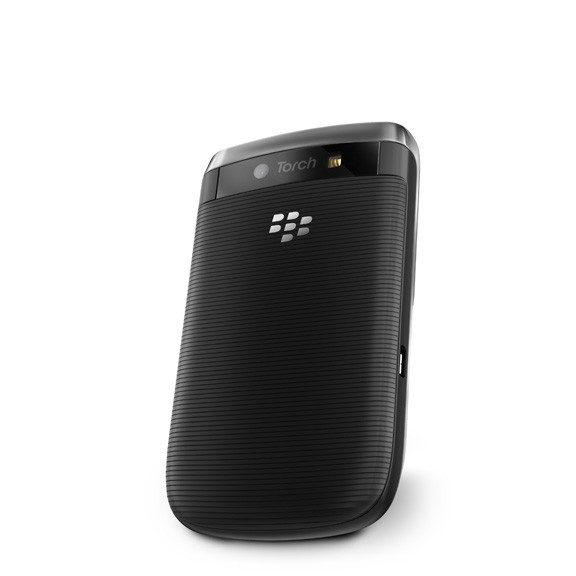
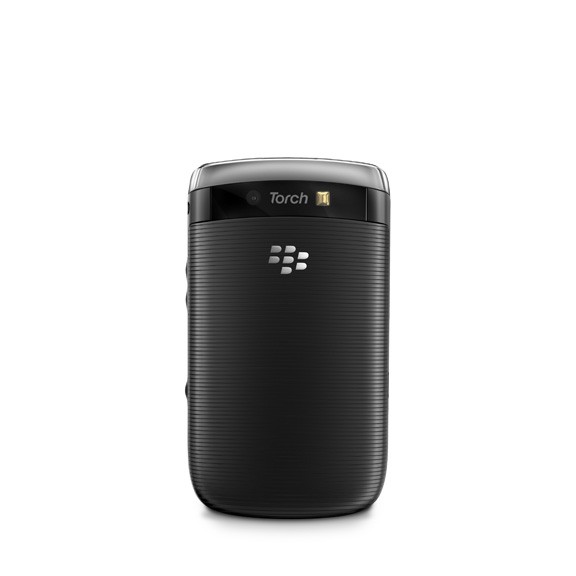
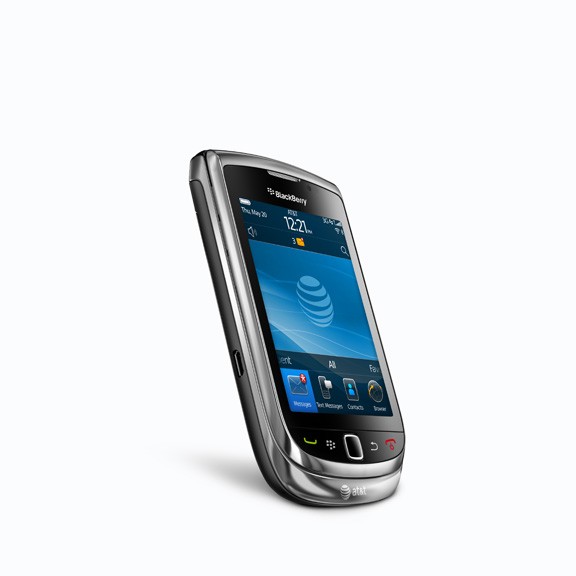
On Tuesday RIM and AT&T formally announced the latest BlackBerry handset and it’s called the BlackBerry Torch.  It’s BB’s first slider smartphone, and it comes with a full QWERTY keyboard BB users are accustomed to.  Let’s run through the specs, shall we?  The Torch packs a 3.2″ (360 x 480) capacitive touch screen display,  5.0MP camera with flash, auto focus, image stabilization and geo-tagging, built-in GPS and 802.11n WiFi, quadband 3G radio, and 512MB of Flash memory with 4GB on-board and a microSD/SDHC memory card slot for additional storage (up to 32GB supported).  It measures 4.4″ x 2.4″ x 0.57″ when closed and 5.8″ x 2.4″ x 0.57″ when the slider keyboard is out.  Face buttons include start/end calls, main menu, back, and an optical trackpad.  The Torch will be the very first BB to run the just detailed BlackBerry 6 operating system.  This means it will include the fast Webkit browser (for which it was named after–RIM recently bought a company named Torch Mobile), integrated social feeds, a new multimedia experience, and universal search.  The phone will be made available to purchase on August 12 for $199.99 on a new two-year contract with AT&T at Best Buy, Wal-Mart, RadioShack, and AT&T stores.

The brand new form factor is extremely compelling.  It’s the new OS, which seems to be following the pack and not making its own strides, that I am worried about.  Look in the gallery below for press shots and after the break for the PR and two “launch videos”.

[Via Engadget]

Continue reading BlackBerry Torch slider QWERTY smartphone runs BlackBerry 6, hits AT&T August 12 for $199.99

Twitter rolls out “Suggestions for You”

So you have a Twitter account and you follow your friends and a handful of celebrities.  What if I told you there was a way to follow even more people (and potentially gain more followers) who share similar interests as you?  A new feature called “Suggestions for You” now located in the Find People section does just that!  The Twitter relevance team has discovered a way to harness an algorithm that can “suggest people you don’t currently follow that you may find interesting.”  Factors including people you follow and the people they follow are taken into considertation when you use the new tool.  Login to your Twitter account and see what’s suggested to you.  If you happen to find someone you’re interested in following, click “Follow”; if the results include people you’re not interested in following, click hide and the tool will remember not to suggest those persons again.

[Via TwitterBlog]

Music video: Linkin Park – “The Catalyst”

After a three year absence Linkin Park is back.  Their fourth studio album A Thousand Suns drops on September 14.  The first single off the album is called “The Catalyst”.  The band decided to take a non-traditional route in promoting the track in collaboration with the upcoming video game Medal of Honor.  The video, directed by Linkin Park’s Joe Hahn, mashes together live and gameplay combat footage; the result is pretty stellar.

[Via EW-MusicMix]

Apple refreshes iMac, Mac Pro, Cinema Display; intros Magic Trackpad and Battery Charger

On Tuesday Apple refreshed their iMac and Mac Pro computers, pushed out a larger Cinema Display, and introduced a new input device for the iMac called Magic Trackpad.  Roundup time!

The new iMac family now features Core i3, Core i5, and Core i7 processors and upgraded graphics cards from ATI.  The displays feature IPS technology (for better viewing angles) and the SD card slot now supports the SDXC format.  The two 27-inchers can be customized with an HDD and SSD (either can function as primary or secondary drive).  Available today.  Check out the lineup:

*$1,199 :: 21.5-inch 1920 x 1080 LED-backlit display; 3.06 GHz Intel Core i3 processor with 4MB shared L3 cache; 4GB 1333 MHz DDR3 SDRAM expandable to 16GB; ATI Radeon HD 4670 discrete graphics with 256MB GDDR3 SDRAM; 500GB Serial ATA hard drive running at 7200 rpm.

*$1,499 :: 21.5-inch 1920 x 1080 LED-backlit display; 3.20 GHz Intel Core i3 processor with 4MB shared L3 cache; 4GB 1333 MHz DDR3 SDRAM expandable to 16GB; ATI Radeon HD 5670 discrete graphics with 512MB GDDR3; 1TB Serial ATA hard drive running at 7200 rpm.

*1,699 :: 27-inch 2560 x 1440 LED-backlit display; 3.20 GHz Intel Core i3 processor with 4MB shared L3 cache; 4GB 1333 MHz DDR3 SDRAM expandable to 16GB; ATI Radeon HD 5670 discrete graphics with 512MB GDDR3; 1TB Serial ATA hard drive running at 7200 rpm.  Configure-to-order options include a 3.6 GHz Core i5 processor, 2TB hard drive, 256GB solid state drive (SSD) and up to 16GB of RAM.

*1,999 :: 27-inch 2560 x 1440 LED-backlit display; 2.8 GHz Quad-Core Intel Core i5 processor with 8MB shared L3 cache; 4GB 1333 MHz DDR3 SDRAM expandable to 16GB; ATI Radeon HD 5750 discrete graphics with 1GB GDDR5; 1TB Serial ATA hard drive running at 7200 rpm.  Configure-to-order options include a 2.93 GHz Quad-Core Intel Core i7 processor, a 2TB hard drive, 256GB solid state drive (SSD) and up to 16GB of RAM.

All iMacs come included with :: slot-load 8x SuperDrive with double-layer support (DVD±R DL/DVD±RW/CD-RW); Mini DisplayPort for audio and video output (adapters sold separately); AirPort Extreme 802.11n wireless networking & Bluetooth 2.1+EDR; iSight video camera; Gigabit Ethernet; four USB 2.0 ports; one SDXC SD card slot; one FireWire 800 port; built-in stereo speakers and microphone; and Wireless Apple Keyboard, Magic Mouse.

Look after the break for a breakdown of the Mac Pro and LED Cinema Display refreshes and to learn all about the new Magic Trackpad and Apple Battery Charger.  Plus, there’s a plethora pictures ranging across all the different products. Continue reading Apple refreshes iMac, Mac Pro, Cinema Display; intros Magic Trackpad and Battery Charger

Eligible for a free iPhone 4 case? Here’s how you get it.

With the fiasco dubbed Antennagate behind us now, it’s time to embrace iPhone 4 with all its advantages and disadvantages and move on.  At the impromptu press conference two weeks ago, Apple CEO Steve Jobs announced that all iPhone 4 owners (who purchase their phones before September 30) are eligible to get a free Apple Bumper or third-party case.  The free case is the solution for your antenna woes; it will cover the vulnerable spot at the lower left corner.  Here’s how you go about applying for a case:

1. Download the iPhone 4 Case Program app from the App Store.
2. Launch the app on your iPhone 4 and sign in using your iTunes Store account or Apple ID.
3. Select your Bumper or case.

For iPhone 4 purchases made before July 23, 2010, you must apply no later than August 22, 2010; otherwise, you must apply within 30 days of your iPhone 4 purchase. To qualify for this program, you must purchase your iPhone 4 by September 30, 2010.

It’s that simple, really.  All cases come in black only and they include Apple Bumper, Incase Snap Case, Belkin Shield Micra, Griffin Motif, Griffin Reveal, Speck Fitted, and Speck PixelSkin HD.  There’s a 3-5 week wait for delivery, so sit tight!

If you purchased an Apple Bumper when you picked up your iPhone 4 at an Apple Store with a credit card, you will receive an automatic refund on your card if you haven’t already (you are notified by email).  If you paid with cash you must bring the receipt to the Apple Store to get a refund by 9/30.  If you bought one at an AT&T store you can receive a refund if you fill out and send this rebate coupon by 9/30.

[Via Apple; Engadget]

Microsoft one-ups Google Maps with Street Slide

With Google Maps and Bing Maps Streetside you can navigate between immersive 360-degree panoramas to visualize your route.  Although this street-view integration is very helpful in visualizing your route before you drive it, there are problems with it and the brainiacs at Microsoft Reseach think they have the solution.  They describe the problem like this: “The discrete moves from bubble [360-degree panorama] to bubble enabled in these systems do not provide a good visual sense of a larger aggregate such as a whole city block.  Multi-perspective “strip” panoramas can provide a visual summary of a city street but lack the full realism of immersive panoramas.”  In other words they can be quite disorienting.  Their solution, called Street Side, allows you to seamlessly zoom out of the bubble to view a multi-perspective panorama view of a street.  In this zoomed out view you can pan across an entire street to find exactly what you’re looking for or to plan your route in a more effective way.  Once you find a particular destination or a location you’d like to investigate further simply zoom in to view a part of a street on more detail.  The mapping tech is extremely impressive; check it out for yourself in the demonstration above.  The developers are currently making an iPhone (and presumably a Windows Phone 7) version of the maps to bring to mobile devices.  Don’t get too excited, though; only about 2400 panoramas of 4 kilometers of streets has been covered thus far.

[Via Engadget; Microsoft]

YouTube increases upload limit to 15 minutes, lets us play Snake during buffer periods

Since its inception way back in 2005 YouTube limited video upload length to 10 minutes.  After reviewing their most requested features, YouTube has decided to increase that limit by 50 percent to 15 minutes.  Up to this point only revenue-sharing “parterns” have been allowed to upload video longer than 10 minutes, but now good ‘ol regular users can get in on the fun.  I’m not so sure if I need to witness an extra 5 minutes of “double rainbow all the way” (OK, maybe I do), but this increase will definitely help out those users who upload lengthy tutorials; now you might notice a smaller amount of videos being broken up in “parts” thanks to the increase time limit.  Take heed: “If you’re uploading a video that was previously rejected for being too long, you’ll have to go into “My Videos” and delete it before attempting to upload it again.”

In other YouTube news… do you remember the super simple but classic and highly addicting game called Snake?  It was preloaded onto many early Nokia dumbphones back in the day.  It’s the one where you take the form of a snake and your goal is to collect small food pellets the pop up in different areas on the screen; every time you eat a pellet the snake grows longer.  You lose when you tie yourself up and make the snake’s head run into a part of its body or run into the edges of the screen.  Anyway…YouTube has incorporated the game into all of its videos as an easter egg.  While you’re waiting for a video to start streaming (or if it gets stuck buffering) start mashing the left arrow key on your keyboard to turn the video loading circle icon into a snake; play with the directional keys.  If you want to give it a try but have fast Internet speeds, trying loading an intensive HD 1080p or better yet a 4K resolution video.  Happy trails.

[Via YouTubeBlog; Engadget, here & here]