Category Archives: Technology

Consumer Reports says they “can’t recommend the iPhone 4” due to the antenna problem

Today Consumer Reports updated their original review of the iPhone 4 after properly testing the device’s antenna.  In their original review, CR recommended the iPhone 4: “The iPhone scored high, in part because it sports the sharpest display and best video camera we’ve seen on any phone…”  They go on to praise the improved battery life, front-facing camera, and built-in gyroscope.  During their time with the initial review test unit, they were “unable to replicate the [antenna] problems” that so many other iPhone owners seemed to be complaining about.  For some reason or another, CR decided to bring the iPhone 4 into their labs to test the antenna problem head-on.  (Why they didn’t do this in the first place is beyond me.)  Their findings:

When your finger or hand touches a spot on the phone’s lower left side—an easy thing, especially for lefties—the signal can significantly degrade enough to cause you to lose your connection altogether if you’re in an area with a weak signal. Due to this problem, we can’t recommend the iPhone 4.

The tests were conducted inside a radio frequency isolation chamber, a room “which is impervious to outside radio signals.”  After connecting “the phones to our base-station emulator, a device that simulates carrier cell towers” they concluded that all of their iPhone models were affected with the antenna problem.  They also tested other AT&T smartphones (namely the iPhone 3G and Palm Pre) and “none of those phones had the signal-loss problems of the iPhone 4.”  Boom.

CR goes on to say that these tests call into question Apple’s forthcoming software quick update which promises to fix the way the signal bars are displayed on the phone.  After coming to this conclusion, they hint that the antenna problem is almost certainly a hardware issue, and a software update and blaming AT&T’s less than stellar network will not pave a way out of this sticky situation.  Speaking of sticky, CR recommends that those affected with the antenna problem can remedy it by applying a small piece of duct tape over the antenna gap.  Not only does this make the phone look downright ugly, it’s going to leave sticky residue and you just don’t want that on your hands (and mind).  Go out and get a bumper case if you can’t manage to hold your phone differently.  CR parts with these glum words: “Apple needs to come up with a permanent—and free—fix for the antenna problem before we can recommend the iPhone 4.”  If the antenna problem is truly hardware-based (and it’s really starting to seem like it is), Apple needs to come out of hiding, admit their design flaw, fix it interally, and offer those affected with a free swap-out of updated models.  Like stat.

[Via Consumer Reports]

Ridley Scott invites you to become part of history in ‘Life in a Day’ film project

Every day, 6.7 billion people view the world through their own unique lens. Imagine if there was a way to collect all of these perspectives, to aggregate and mold them into the cohesive story of a single day on earth.

Life in a Day, a YouTube compilation video to be largely edited by Oscar-winning director Kevin Macdonald (The Last King of Scotland) and executive produced by director Ridley Scott (Gladiator, Blade Runner), will attempt to tell such a story.  It’s being hailed as a “historic cinematic experiment” that relies on you (yes, you) to contribute to the short film.  If you want to participate in the effort, all you have to is capture events that happen in your own life on July 24 and upload your video to the Life in a Day channel by July 31.  Here are some suggestions from Google: “You can film the ordinary — a sunrise, the commute to work, a neighborhood soccer match, or the extraordinary — a baby’s first steps, your reaction to the passing of a loved one, or even a marriage.”  Head over to the channel for other ideas that may inspire you.  So here’s the deal: If your footage is selected to be put into the film, you’ll be credited as co-director and if you’re lucky you’ll get to attend the premiere at the 2011 Sundance Film Festival with 19 others.  If you don’t make the final cut, Google reminds you that your submitted footage will live forever on the channel “as a time capsule that will tell future generations what it was like to be alive on July 24, 2010.”  Sappy, but it’s true!  It’s so easy to do these days, you might as well give it a shot.  On the 24th, whip out your Flip cam and take your dog for a walk.  Who knows, maybe you and Scrappy will make it big.  Need some words of encouragement?  Look after the break for a pep talk from Ridley Scott; the Nike shout-out aside, it should get some creative juices flowing.

[Via YouTubeBlog] Continue reading Ridley Scott invites you to become part of history in ‘Life in a Day’ film project

YouTube intros Leanback; supports 4K video; updates mobile site

Over the course of the last few days Google made a number of exciting announcements concerning its popular video site YouTube.  Read on for all the juicy details.  And make sure to peek after the break where you’ll find two brief videos that outline Leanback and YouTube Mobile with the help of visuals.

YouTube Leanback: Leanback is a new way to watch videos on YouTube.  It makes the whole experience of watching Internet video feel more like you’re watching television.  Here’s how.  When you head over to  www.youtube.com/leanback, you are asked to login to your YouTube account.  Once that’s done, you enter the Leanback portal which instantly promotes minimalism.  A video instantly begins to play from a folder called “Your Feed.”  The videos found in this group are all based on your YouTube account settings, preferences, subscriptions, and previously watched videos.  And if you happen to have your YouTube account connected to your Facebook account, videos your friends are watching and sharing will find a home there too.  In addition to “Your Feed”, you can also browse all of the popular YouTube categories that include Comedy, Education, Entertainment, Music, News & Politics, and more.  If you have any uploaded videos in your account, they will show up at the end of this list.  Videos will automatically stream at their highest quality (HD if available).  Everything in Leanback is controlled with the four arrow keys, the space bar, and the enter button on your keyboard.  For now, mouse control is not supported.  The lowest level of the UI is the content categories I just described.  If you click the up arrow, the usual playback controls pop up (play/pause, rewind/fast-forward, previous/next).  If you click the up arrow once more, a search bar appears.  When you search a term, all related content will show up in its own folder next to “Your Feed” down below.  And that’s it, really.  Leanback is all about video playback first, control second.  The concept is neat; login to your account and presto–video (that should be) tailored for you begins to play and you can quickly and easily scrub through it.  Google calls it “effortless viewing.”  So watcha waiting for?  Have at it!

4K video support: Chew on this: “At 4096 x 2304 pixels, 4K is over four times the size of 1080p.”  So if you thought HD was good, you ain’t seen nothin’ yet.  Anyway, now YouTube supports “original video resolution from 360p all the way up to 4K.”  When a 4K video is played, you will have the option to select “original video” to view it at its highest quality.  But don’t get too excited just yet.  You need the proper monitor to view such high grade video; even Google claims that the ideal screen size to view 4K content is 25 feet.  Watching 4K footage also requires extremely fast bandwidth.  Since 4K camcorders and projectors are very expensive they have yet to make it into the mainstream.  But you know what?  I think it’s a great move on Google’s part to start supporting it today in preparation for tomorrow.  Feel free to check out some of the first 4K videos to hit the site.  Just beware of the bandwidth limitations and the fact that you most likely cannot view these videos at their proper resolution just yet.

YouTube Mobile: The mobile version of YouTube (http://m.youtube.com) was launched back in 2007.  Since then, we have become more reliant on cell phones and other portable devices, and users are demanding a more broader YouTube experience when they’re on the go.  That was Google’s cue to revamp the mobile site with updates too appease their most loyal fans.  Let’s run down the most important updates, shall we?  It’s speedier; the user interface incorporates more touch-friendly elements; many features from the .com site have transferred over including search query suggestions, the options to create playlists, and the ability to designate “favorite,” “like” or “unlike” videos; and unlike YouTube apps (ie. iPhone’s YouTube portal), the mobile site will see improvements on a more constant, regular basis.  Click here from your device to check out all the new features and options now available at your fingertips.

[Via YouTubeBlog, here, here & here]   Continue reading YouTube intros Leanback; supports 4K video; updates mobile site

Fring update allows 2-way video calling over 3G with iPhone 4 (and more) [Update: Skype support is gone]

I’m just as surpised as you are when I found out that the boys of Cupertino allowed Fring, a voice/video/IM client app, to update its services to give its users the ability to make video calls over AT&T’s 3G network.  Up until now, iPhone 4 users could make video calls using Apple’s FaceTime feature, and this is restricted to WiFi only and other iPhone 4 users.  With the latest version of Fring, iPhone 4 users have multiple options when it comes to video calling.  They can video chat over WiFi & 3G and with non-iPhone 4 users (it’ll work with any mobile device that carries Fring in its App Store).  And since Fring allows you to connect your Skype account to it, now you can video chat with friends and family from iPhone 4 to a PC/Mac running Skype.  Among other new features, Fring now supports iOS4 multitasking and offers a new “social stream” and a “smarter address book”.  Give it a try now–the updated Fring app is sitting in the App Store for $0.

Some clarification: If you have an iPhone 4, you can use Fring to make video calls with other iPhone 4 users as well as users of other devices.  If the user you are calling is using an HTC EVO 4G, two-way video calling should work just fine since both the iPhone 4 and EVO 4G have front-facing cameras.  If the user you are calling has a phone that does not have a front-facing camera (say, the Droid Incredible), video calling will only work one-way (from iPhone 4 to the Incredible).  Having a front-facing camera is a requirement to send out video; your backside camera will not suffice.  Get it?–got it?–good.

Update: Since the update was pushed out last Thursday, tons of iPhone owners have been testing it and this resulted in “network stress” for Fring’s servers.  For the time being, Fring is “temporarily reducing support to 3rd –party Skype.”  This means that many of your cell phone to PC/Mac audio/video calls mediated by Skype may not go through at this time.  Fring says they’re working on the issue, and they hope the temporary shut down will open up the ether for Fring-to-Fring video calling.

Update 2:  When Fring decided to temporarily pull the Skype service from its app due to “network stress” issues, Skype swiftly insisted that this action was a breach of their API Terms of Use and End User Licence Agreement.  Skype goes on to say that the Fring’s decision to remove Skype functionality “damaged the Skype brand” and reputation.  In a blog post titled “Skype Cowardly Blocks fring“, Fring goes on the defensive and claims that Skype removed itself from the app, while Skype refutes this claim and calls it “untrue.”  Two can play this he said/she said game all day long, but what does this all result in for the end consumer?  No Skype (voice/video) capability with Fring.  And that’s a major disappointment because for that very short period of time, Fring was the only way to make iPhone 4 to PC/Mac video communication.  Blast!  Look after the break for the official statements from both parties involved.

[Via Fring, here, here & here; Skype] Continue reading Fring update allows 2-way video calling over 3G with iPhone 4 (and more) [Update: Skype support is gone]

Stop-motion teardown of iPhone 4 proves it’s beautiful on the inside, too

The fellas at TechRestore are back with a new teardown.  Yup, it’s the iPhone 4.

1784 hi-res photos combine to make a stop-motion expose of the iPhone 4, revealing every detail of construction, from packaging, down to the chips on the logic-board. Set to a custom electronic/glitch soundtrack, with fast paced action, this is no ordinary unboxing and take-apart video!

Well said.  Now watch.

[Via Gizmodo]

“Leaked” PS4 viral videos are fake, still fantastic

In early June two viral advertisements hit the web that claimed to be brand new “leaked” spots for Sony’s next video game console, the PlayStation 4.  The first video dubbed “Leaked Launch Trailer” (see above) features a man inside a lab facility who is wearing what appears to be an advanced pair of 3D glasses that literally brings you into the game.  In the video we watch (along with Japanese testers) the man experience the PS4’s virtual reality capabilities for the first time.  At first the man is spooked by what he sees, but then a glimmer of hope (and success on Sony’s part) is revealed when the man gives a satisfying smirk at the conclusion of the test.  The second video (look after the break for it) is titled “Leaked Viral Video” and plays out like a true viral video, shaky cam and all.  This one follows two frantic Sony employees into a large facility; once there, they find a gamer who is frozen with excitement over the powers of the PS4 system.  The employees remove glasses from his face but cannot pry the game controller out of his hand.  The gamer squeals in joy.

After some investigation, the web realized they were douped when 24-year-old filmaker Han West spilled the beans.  West created these fake viral videos for a school project that required him to produce “one viral ad and one more ‘polished’ commercial.”   “Leaked Launch Trailer”, the polished spot above, took 12 hours to shoot and cost $500.  “Leaked Viral Video” took four hours to capture and cost a mere $20.  In the end, his timing was impeccible; these video “leaked” onto the web just days before E3, leading many to suspect Sony would announce the vision with the PS4 during their press conference.  Job well done, Mr. West.

[Via Kotaku, here & here] Continue reading “Leaked” PS4 viral videos are fake, still fantastic

Farewell, E3 2010

And just like that E3 2010 has come to a close.  Oh, was it a wonderful three days of gaming.  Things kicked off with Microsoft’s bizarre “Project Natal for Xbox 360 Experience” Cirque du Soleil event where we learned Natal’s true name, Kinect.  The Big Three’s press conferences proved to be eventful and packed with awesome new games.  Microsoft showed off exciting trailers and demos for Call of Duty: Black Ops, Metal Gear: Rising, Gears of War 3, Halo: Reach, and Fable III.  Kinect was finally detailed at length, and we got a sneak peek at the Kinect Hub and many of the casual launch titles including Kinect Adventures!, Kinect Sports, Kinect Joy Ride, Kinectimals, Dance Central, and Your Shape: Fitness Evolved.  Sports fanatics were happy to hear news that ESPN content is coming to Xbox Live.  And to conclude the conference Microsoft unvield a refreshed Xbox 360 model that features a sleek, black finish and “whisper quiet” internals.  Nintendo harnessed the power of nostalgia to excite the long-time fanboys (and girls).  Appearences by The Legend of Zelda: Skyward SwordGoldenEye 007, Kirby’s Epic Yarn Metroid: Other M, and Donkey Kong Country Returns did not dissappoint.  Before Nintendo’s conference could come to a close the Nintendo 3DS was officially unveiled.  3D glasses are not required to experience the 3D effect and Kid Icarus: Uprising is a launch title; I want one.  Sony’s press conference pushed for 3D gaming with an impressive demo of Killzone 3 in 3D (glasses (unfortunately) required).  Sony’s turn at motion-based gaming with PlayStation Move was demoed and titles like Sorcery and Tiger Woods PGA Tour 11 utilized the new controllers well.  The introduction of PlayStation Plus (Sony’s subscription based online gaming service), a fantastic trailer for Portal 2, and demos of LittleBigPlanet 2 and Twisted Metal rounded out the conference.  All in all, the Big Three were successful in making gamers ’round the world happy with their upcoming offereings.

After the press conferences ended, the show floor exploded open with hundreds of game demos.  Fortunately almost every booth was filled with knowledgable game developers who were kind enough to speak with me about their creations.  Games like The Legend of Zelda: Skyward Sword, Donkey Kong Country Returns, SOCOM 4, Fable III, the Kinect games, Super Scribblenauts, Tron: Evolution, and the OnLive service impressed me to no end.  But there’s one game that stands out the most.  My favorite game of E3 2010 is Epic Mickey.  The various types of gameplay, visual style, and controls made for an extremely fun and rewarding experience.  I can’t wait for it to release on the Wii this holiday season.

To sum up E3 2010 in so many words–motion-controlled gaming (w/ Kinect & PS Move), 3D gaming (w/ PS3 & 3DS), and fantastic titles (that are both classic and new).  I had such a great time attending this event for the very first time, and I hope you found my extensive coverage to be interesting, informing, and engaging.  I look forward to attending next year’s show and I already have plans to make my coverage even more exciting and comprehensive!  I’d like to give a huge thank you to Regina Durkan and Talia Chriqui for their help on the show floor and behind the scenes.

If there’s any E3 content you missed or like to read/watch again, take a look at the links below.  Or you can always click the “[experience-it-all] at E3” coverage button that’s located at the top right-hand corner of the home page.

Pre- E3

[experience-it-all] @ E3 2010
E3 2010: What to expect
Preview: Project Natal for Xbox 360 Experience


Pre- show floor

Day Zero: Project Natal for Xbox 360 Experience
E3 2010: We’ve arrived
Microsoft press conference highlights: Kinect, ESPN, Xbox slim
Nintendo press conference highlights: Nintendo classics make a comeback, plus 3DS handheld
Sony press conference highlights: Move, 3D gaming, PS Plus, Portal 2


Hands-on

Hands-on: The Legend of Zelda: Skyward Sword
Hands-on: Nintendo 3DS
Booth tour: Nintendo (plus hands-on)
Hands-on: Kinectimals
Hands-on: Joy Ride
Hands-on: Kinect Adventures! & Kinect Sports


Interview + hands-on

Interview + hands-on: Metal Gear Solid: Peace Walker
Interview + hands-on: SOCOM 4 (w/ PlayStation Move)
Interview + hands-on: TV Superstars (w/ PlayStation Move)
Interview + hands-on: The Fight: Lights Out (w/ PlayStation Move)
Interview + hands-on: Fable III
Interview + hands-on: Super Scribblenauts
Interview + hands-on: Epic Mickey
Interview + hands-on: Tron: Evolution
Interview + hands-on: OnLive


Booth tours

Booth tours: Capcom & Sony Online Entertainment
Booth tours: 2K, Konami & Warner Bros. Interactive Entertainment
Booth tours: Square Enix, Ubisoft & Disney Interactive Studios
Booth tours: Sega, THQ & EA
Booth tours: Microsoft & Sony
Booth tours: MTV Games/Harmonix
 

Microsoft Kin is no more, T-Mobile Sidekick discontinued


Remember Microsoft Kin, the little (smart)dumbphone that could?  Well Microsoft has decided to scrap it and focus entirely on Windows Phone 7.  Here’s the official statement:

“We have made the decision to focus exclusively on Windows Phone 7 and we will not ship KIN in Europe this fall as planned.  Additionally, we are integrating our KIN team with the Windows Phone 7 team, incorporating valuable ideas and technologies from KIN into future Windows Phone releases.  We will continue to work with Verizon in the U.S. to sell current KIN phones.”

The major reason why Kin is being shut down is sales, or lack thereof.  Though Microsoft never mentioned how many handsets were sold, they neither confirmed nor denied a rumor that a mere 500 Kin devices have sold thus far.  Shortly after slashing the prices of Kin One and Kin Two to $29.99 and $49.99, respectively, Microsoft abruptly made the decision to cancel what was forever rumored as “Project Pink” for good.

Besides terrible sales figures, Engadget has a scoop that pretty much says Kin was doomed from the start.  Internal bickering between two Microsoft employees who had differernt visions for the company’s place in the mobile space ultimately sparked the eventual fall of Kin.  Here’s the short of it: In 2008 Microsoft bought Danger, the company behind the original Sidekick phone.  In collaberation with Danger folk, Microsoft created what was then known as Project Pink.  It was headed by now ex-Microsoft employee J Allard.  Allard envisioned the Kin line of devices and services separate from Windows Mobile, but Windows Mobile head Andy Lees had different plans.  Lees found Kin a distraction from what he believed was more important (the formation of Windows Phone 7), managed to take away Kin from Allard, and that’s when the phone was released into the wild.  It was put out on the market under a Microsoft mobile head who was not one-hundred percent invested in the product.  Hence, it was doomed from the start.

In the end, Microsoft (and Verizon) really didn’t do a great job at pricing and marketing the phone properly.  Kin was aimed at what Microsoft called “generation upload” (aka tweens and teens) who are constantly texting and social networking on Facebook.  The two devices were originally priced at $99 & $49 each, with monthly data plans costing $29.99/month (and that’s on top of a talk plan).  These devices were way out of the price range for the phone’s target demographic.  That’s no way to price a feature phone.  And don’t get me started with that terrible fake hipster marketing campaign!  Anyway, now that Kin is dead I hope that the custom software and services it introduced find their way into Windows Phone 7, as Microsoft promises.  The Kin Loop and Kin Spot made for an interesting take on managing social networks, but it’s the Kin Studio that held the most promise.  The ability to archive all of your phone’s content to the cloud and access it on any PC in a browser is a genius idea, one that I hope gets utilized with WP7 devices. Continue reading Microsoft Kin is no more, T-Mobile Sidekick discontinued

Hulu Plus brings TV & movie content to Apple devices, Xbox 360, PS3, TVs & Blu-ray players

The rumor mill just couldn’t handle it anymore so Hulu decided to make things official: Hulu is expanding its video streaming services to an electronic device near you.  The new subscription-based service does not replace Hulu.com, mind you; it gives TV addicts the option to pay $10/month to access full libraries of TV shows on their computers and many other devices.  So you know how many of your favorite TV shows you watch on Hulu.com are limited to streaming only five episodes at a time?  Hulu Plus subscribers will gain access to every episode of every season “for almost all of the current broadcast shows” Hulu offers.  In addition to having access to modern hit shows like House and Modern Family, Hulu Plus subscribers will be able to watch  “back seasons or full runs” of some classic TV shows.  These include The X-Files, Arrested Development, and Buffy the Vampire Slayer. Hulu calls it “a treasure chest in the cloud for TV lovers.”  I concur.  And here’s the kicker: all native HD content will stream in 720p high definition.

If you’re a Hulu Price subscriber you can take all your Hulu content into your living room and on the go.  I’ll list out the devices.  Samsung Internet-connected and Samsung App-enabled TVs & Blu-ray players (available today); Sony & VIZIO Internet-connected TVs & Blu-ray players (support coming Fall 2010); Microsoft Xbox 360 (coming early 2011); Sony PlayStation 3 (coming soon).  Got an Apple device?  There’s a Hulu Plus app available in the App Store; it runs on iPhone 4, iPhone 3GS, iPod touch 3G (all running iOS4), and iPad.  And it will stream content over 3G and WiFi.  Score!  You can download the app today for free and watch some free content to test it out for yourself.  It’s pretty incredible, the ability to watch all your favorite (network) TV shows in HD away from the computer.  Sure you have to cough up $10 a month but if you’re a TV junkie like me, a price like that might just have you consider cutting the cable cord and opting for Hulu all the way.  Unless, of course, True Blood and Mad Men mean too much to you.  Decisions, decisions..

Currently Hulu is handing out invitations for Hulu Plus.  If you want to be considered for the first wave of subscribers, click here.  Hulu says, “We’ll be sending out as many invitations as we can each week, and as soon as we’re ready, we’ll remove the need for an invitation and start bringing in new subscribers without delay.”  Look after the break for an informative video about Hulu Plus.

[Via HuluBlog] Continue reading Hulu Plus brings TV & movie content to Apple devices, Xbox 360, PS3, TVs & Blu-ray players

PlayStation Plus gets detailed, available today with PS3 firmware update 3.40

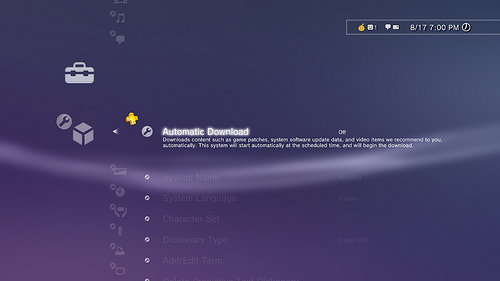
PlayStation Plus, Sony’s online premium offering for the PlayStation 3, was announced at the Sony press conference a couple weeks ago.  Since then more details have spilled concerning what exactly it offers for paying subscribers.  First, it’s important to remember that PlayStation Plus does not replace PS3’s current offering of free online gameplay and PlayStation Network usage.  PS Plus is an additional, optional service that provides subscribers with discounts on games purchased in the PS Store, early access to betas, exclusive offers on select demos and early purchases, free monthly episodes of Qore, and automatic downloads.  Let’s dive a bit deeper.

Subscribers have access to free monthly PSN games, minis, and PS One Classics from the PSN Store.  You keep these games for as long as you’re a subscriber; if you decide to opt out of the service, the free games disappear from your library.  Exclusive themes, avatars, and premium game elements/add-ons are also available to purchase; these are yours to keep “forever.”  Exclusive PS Store discounts are also offered, ranging from from 20% to 50% off (that’s on top of the any current discounts currently available to non-members).  Again, these are yours to keep “forever.”  Early access to beta trials and game demos pop up as well.  Members can download a full game trial for an alloted amount of time (typically one hour) to decide if they want to purchase the game.  Unlike a standard game demo, full game trials do not restrict you to certain levels/game modes.  You get the full game.  And get this–if you decide to purchase the game after testing it out, all awarded trophies and saved data carry over from the trial.  Lastly there’s automatic downloads.  Subscribers can set their PS3 to wake up from standby at a determined time to automatically download PS3 firmware updates, game patches, and “select demos and videos.”  PlayStation Plus is available to sign up for today over PSN.  A one year subscription goes for $49.99 (this comes bundled with three free months at the end) and a three-month packaged is priced at $17.99.

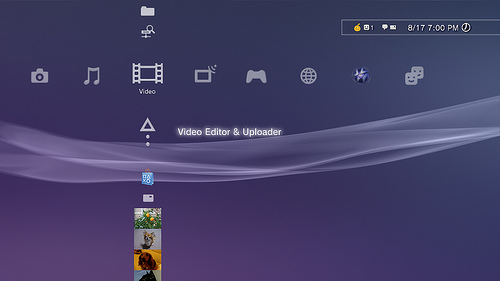
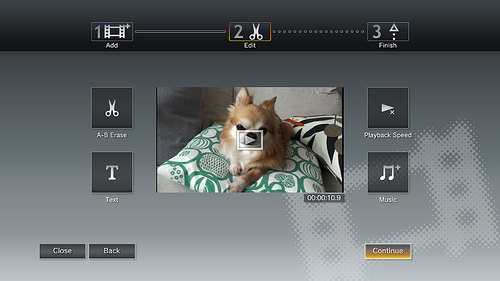
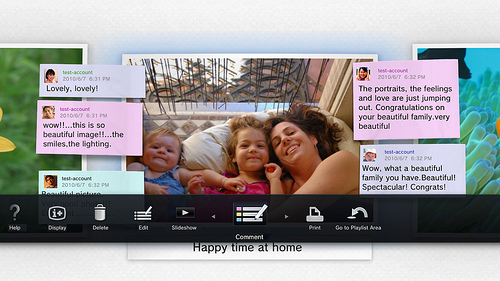
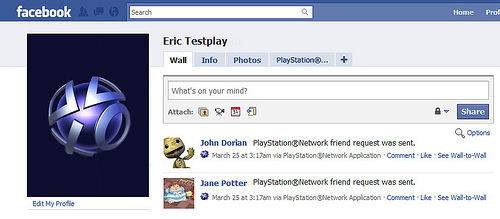
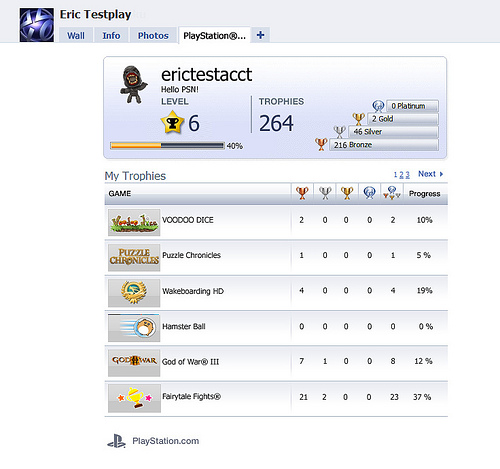
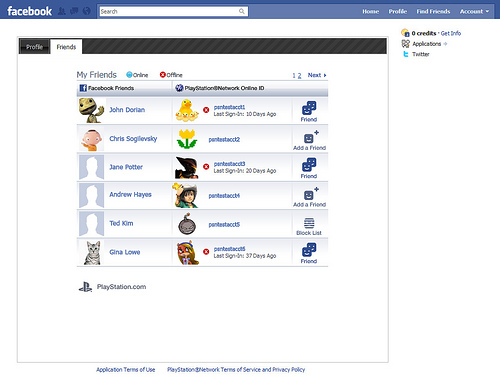
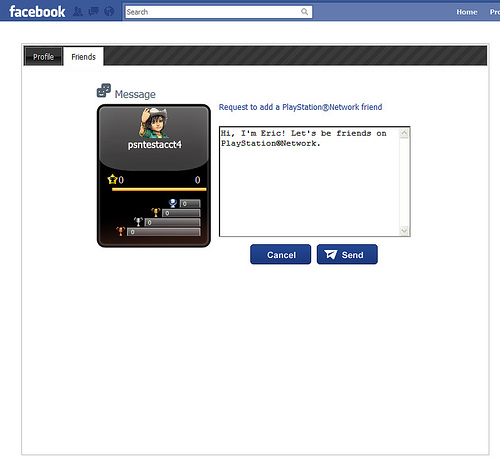
PlayStation Plus came to the PS3 as part of firmware update version 3.40.  Here’s what the update brings: Photo Gallery enhancements (allows you to upload, browse and comment on photos on Facebook and Picasa Web Album & share your photos between your PSN friends and print photos from Photo Gallery); Video Editor and Uploader (new XMB function enables you to edit, save and upload video files stored on the PS3 system to sites such as Facebook or YouTube); Five Star Rating Support (you can rate PS Store content on a five-star scale); and additional power save options.  There’s also been a few upgrades to PSN-Facebook integration.  A new PSN Facebook application allows you to display your PlayStation Network profile on Facebook, send friend requests, and view your PSN friends’ online status.  Check out a few snapshots of the new features in the gallery below.

[Via PlayStationBlog, here & here]