Category Archives: Video

IBM’s Watson supercomputer vs. humans in a game of Jeopardy

On February 14, 15, and 16 two Jeopardy champions Ken Jennings and Brad Rutter will face off against each other and a supercomputer named Watson.  Named after IBM founder Thomas J. Watson, the supercomputer is comprised of 10 racks full of IBM Power 750 servers, with 15 terabytes of RAM and 2,880 processors operating at a collective 80 teraflops.  To say this machine is powerful is a grand understatement.  With Watson, IBM’s goal was to “build a computing system that rivals a human’s ability to answer questions posed in natural language with speed, accuracy and confidence.”  And that it does.  As you can see the in the video above, Watson performed extremely well at last week’s practice round of Jeopardy before the February main event.  IBM has created a terrifyingly smart machine in Watson; not only does it simply answer questions but it also intuitively understands the questions being asked, buzzes in, and speaks in human-ish voice (not unlike 2001‘s Hal).  In essence, when a question is asked Watson uses algorithms (brain power?) backed up by vast databases of learned knowledge to formulate a response.  Watson is not controlled by outside forces (i.e. humans) and it is not connected to the Internet, so technically it’s not cheating.

During its development period engineers threw thousands of questions at it and so now they believe it’s ready for prime time. “After four years, our scientific team believes that Watson is ready for this challenge based on its ability to rapidly comprehend what the Jeopardy! clue is asking, analyze the information it has access to, come up with precise answers, and develop an accurate confidence in its response,” said Dr. David Ferrucci, the scientist leading the IBM Research team behind Watson. “Beyond our excitement for the match itself, our team is very motivated by the possibilities that Watson’s breakthrough computing capabilities hold for building a smarter planet and helping people in their business tasks and personal lives.”

Or it will end up creating its own army of supercomputers and kill us all.  Wondering how Watson did at the completion of the practice round?  Watson: $4400. Jennings: $3400. Rutter: $1200.  Watch Watson dominate this February and prepare for J-Day.

[Via Engadget, here & here; IBM]

YouTube documentary ‘Life in a Day’ premieres January 27

Remember that crowd-sourced documentary film attached to filmmakers Kevin Macdonald and Ridley Scott I was telling you about back in early July?  Well it’s almost complete and ready for us to enjoy!  Here’s a quick refresher if you need it.  Life in a Day is described as “a historic cinematic experiment to document a single day on Earth.”  Director Macdonald and producer Scott asked people all around the world to film their day on July 24, 2010.  Over 80,000 video clips of people’s lives were submitted (over 4500 hours of footage), and a team of editors managed to whittle it all down into a 90 minute documentary film “that gives an honest and inspiring glimpse of our world.”  Of the 80,000 clips originally submitted, 1,125 of them made it into the final cut.  One of these chosen clips is embedded above; the beautifully shot clip called “Slim Up” was shot by by Toniu Xou and Patricia Martinez del Hoyoa of Spain and features a young girl climbing a human castle in the small town of San Jaume dels Domenys in the Spanish province of Tarragona.  This is just a sneak peak into what the film will encompass.  The film “really gives you a flavor of what it was like to be alive on 24th July 2010,” says Macdonald.

Life in a Day will premiere January 27 at the 2011 Sundance Film Festival, and it will be broadcasted live on YouTube for everyone to see that day at 8PM EST.  Following the premiere the director of the Festival will conduct an interactive interview with Macdonald and the 20 top contributors of the film.  Starting Monday, January 24 you can submit questions and maybe yours will get picked when the interview is streamed after the film.

Bookmark the Life in a Day YouTube channel and check back there on the 27th at 8PM to watch what promises to be an exciting and curious look into a single day of humanity.  Look after the break to watch a recent and informative interview with Macdonald and editor Joe Walker.

Update: National Geographic has partnered up with YouTube to acquire the rights to bring the doc to the States. If you missed Life in a Day when it streamed online, it’s expected that Nat Geo will release it in theatres on July 24, 2011; yes, that is exactly one year after all the footage was shot.  A DVD release with bonus content will follow.

[Via YouTubeBlog; Deadline] Continue reading YouTube documentary ‘Life in a Day’ premieres January 27

Trailer #2: Paul

The official U.S. trailer of the upcoming Simon Pegg/Nick Frost sci-fi road trip comedy has hit the ‘Net.  In it you should spot Jane Lynch, Jason Bateman, Kristen Wiig, Bill Hader, and other surprises.  If for some crazy reason you couldn’t recognize the alien’s voice–that’s Seth Rogen.  Feel free to rewatch the international trailer right here.  Paul hits theatres March 18, 2011.

Actor Bryan Greenberg’s album releases next week, ‘How To Make It In America’ season 2 in production [Update: Stream single here]

Bryan Greenberg, the star of HBO’s How To Make It In America, is about to drop his debut album.  It’s called We Don’t Have To Wait Forever and it releases January 18.  It’s being described as “a fresh collection of introspective narratives and soulful ballads” and it features a track called “You Can Run” that features Kid Cudi.  Back in June Cudder dropped by a live Greenberg performance and laid down a freestyle and joined in on the chorus.  In an interview with Complex Magazine Greenberg shares the story:

“I did have one [song] in mind for him and he did it live. He came to my show like a year ago in New York, when I was on tour. He jumped on stage for a little freestyle. When he heard the song he was like, “I really like it and that’s why I’m going to do it.” I was really honored by that. I thought he was going to rap, but he sang. It was cool. He’s really a true artist.”

Looking forward to the second season of HTMIIA?  In that same interview Greenberg talked about what’s in store for Ben and Cam.  “[The show] hasn’t reached the tipping point at all. I’m going back to L.A. next week and we’re going to do read-throughs of the first four episodes. I’m super excited. It’s going forward a couple of months and the business is growing…it’s like, how does this guy become Ralph Lauren? How does it happen? We take if from the street, like early, early sh– to like…that’s the goal, you know? It’s going to take years to develop.”

Preview the album’s lead single “Walk Away” in the video embedded above.  How to Make It In America season 2 is currently in production and is expected to air this summer.

Update: The acoustic-based single “You Can Run” featuring Kid Cudi’s singing voice is now available to stream!  Listen to it below and download it here.

Download: Bryan Greenberg – “You Can Run” (Featuring Kid Cudi)

[audio: Bryan Greenberg – You Can Run (Featuring Kid Cudi).mp3]

Fun fact. The inspiration for the song actually stems from Greenberg’s character Ben from HTMIIA.  “I was kind of writing from the point of view of Ben and being scorned by Rachel and that just being a reason to succeed in life,” he says. “I did notice that a lot of successful people in this world, they always say that it’s about the art or it’s about the work. But when it comes down to it, [what drives them is that] they were made fun of in high school. Or there was a girl that dumped them and they’re trying to get back at them. I was coming from that mentality.”

[Via DatNewCudi; Complex; EW; HipHopUpdate]

Motorola invites Bionic into the Droid family

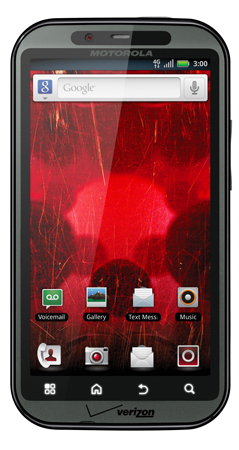
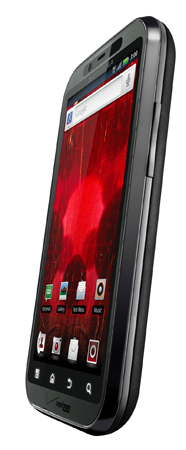
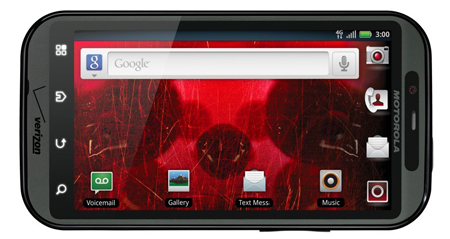
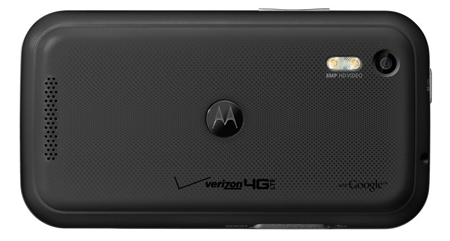
The Droid Bionic from Motorola is one helluva smartphone.  It’s super fast, both in processing and network speeds.  It’s one of the first mobile phones to pack a dual-core processor, with each core running at 1GHz, delivering up to 2GHz of processing power, and it’s Moto’s very first 4G LTE enabled phone.  More specs: 4.3-inch qHD display, 512 MB of RAM, rear-facing 8-megapixel camera, front-facing VGA camera, HDMI out.  It will ship with Android 2.2 (Froyo) on board.  Moto’s also pushing Mirror Mode, a function that enables simultaneous streaming of video to the TV and on the device.  All in all, this is a pretty solid device.  2011 is going to see a big push towards faster phones with larger, higher quality displays and right now the Bionic is the clear leader of the pack.  Precise price point and release date have not been specified yet, but you can expect it the Bionic to land on Verizon Wireless in Q2 2011.

At CES 2011 Verizon kept reiterating the blazing speeds of 4G LTE.  They claim the next-gen cell service is up to 10 times faster than current 3G speeds and they used a fun example on stage at their press event to show how these incredible speeds can be utilized.  They invited Electronic Arts to show off Rock Band Mobile‘s multiplayer capabilities.  Owners of select 4G LTE devices will be able to “jam together” with up to four friends over the network.  Verizon is hopeful Android apps will take advantage of 4G LTE’s fast speeds with wireless connectivity functionality as featured in the upcoming Rock Band game.  Look after the break for the PR which lists the 20 songs in the game; there you’ll also find a video demonstration.  If you didn’t know, Verizon plans to expand its 4G network to blanket its entire 3G coverage area within the next three years.

[Via Engadget, here & here]

Continue reading Motorola invites Bionic into the Droid family

Motorola Xoom & T-Mobile G-Slate will run Android Honeycomb

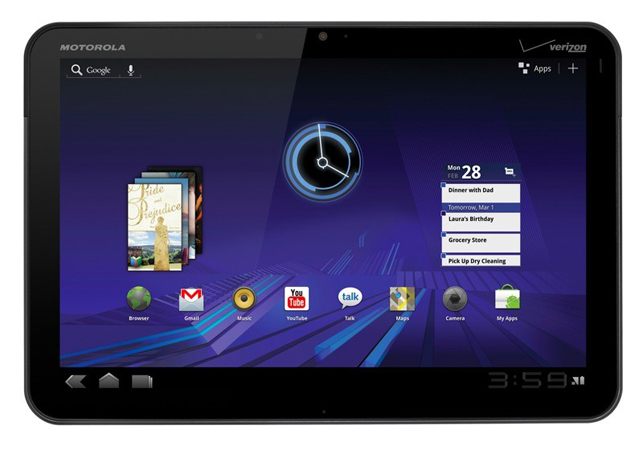
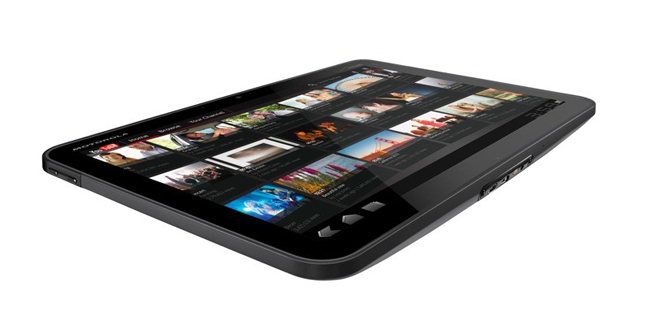
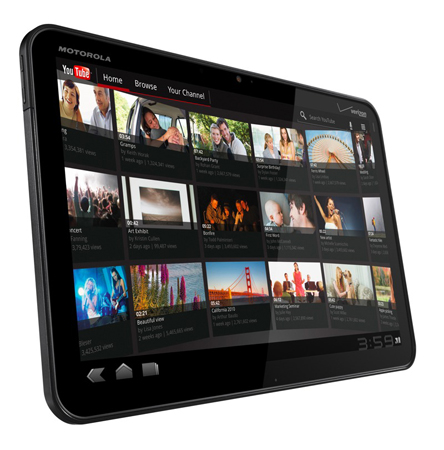
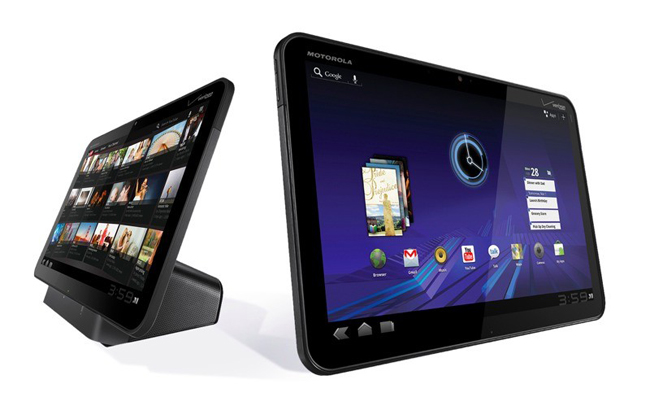
Motorola and T-Mobile were downright giddy to announce their upcoming tablet devices at CES 2011.  That’s because they are excited to bring Honeycomb, Google’s latest iteration of Android built entirely for tablets, to salivating consumers.  Since I already detailed Honeycomb, I think it’d be best to simply jump into specs talk.  Let’s start with the Motorola Xoom since there’s far more information about this product out there.  The Xoom features a 10.1 inch (1280×800) screen and packs NVIDIA’s latest Tegra 2 1GHz dual-core processor and 1GB of DDR2 RAM.  There’s a 5 megapixel rear-facing camera with dual LED flash and a 2 megapixel front-facing camera; support for 720p video recording and 1080p video playback; 32GB of onboard storage that’s expandable with SD card support; 802.11n WiFi, Bluetooth; and ports include HDMI out, micro USB 2.0, and a 3.5mm headphone jack.  There’s also a built-in gyroscope, barometer, e-compass, accelerometer and adaptive lighting.  It will ship with 3G support and eventually gain 4G LTE support on Verizon’s network.  As far as battery life is concerned, Moto’s only saying that it supports up to 10 hours of video playback.  Note that the Xoom does not pack physical buttons.  With Honeycomb, Google no longer requires hardware manufacturers to include buttons along the rim of their devices.  What used to be buttons are now illuminated icons that can be made visible on the device in landscape or portrait modes.  Motorola says they’ll ship the sexy Xoom tablet as a 3G/Wi-Fi-enabled device in Q1 2011 (we’re in that quarter now, so soon!) and they promise these devices will be upgradeable 4G LTE in Q2.  Also in Q2 Moto will introduce an all-out 4G LTE/Wi-Fi- enabled Xoom.  According to recent reports, a strictly WiFi-enabled version will also debut in the Spring.  The Xoom looks like it’s going to be a hot item when it ships; a speedy Tegra 2 processor and the tablet-optimized Honeycomb OS marriage will surely make for an enjoyable mobile experience.

An honorable mention goes to the T-Mobile G-Slate because it is just one of the few tablets announced at CES 2011 that promises to run Honeycomb when it releases.  T-Mobile has partnered with LG to make the hardware. Aside for it being the “first 4G Android 3.0 powered tablet” from T-Mobile, we know nothing else about it really.  At the press event T-Mobile and LG execs held up the mystery tablet, and it look like standard fare–a black slate.  We’ll have to wait for a more detailed announcement in the coming weeks.

Look in the gallery below for close-ups of the Motorola Xoom, and hop after the break to read some PR and watch a couple introductory product videos.

[Via Engadget, here & here]

Continue reading Motorola Xoom & T-Mobile G-Slate will run Android Honeycomb

Android 3.0 (aka Honeycomb) revealed at long last

This week at CES 2011 tablets were all the rage.  Sure, we’ve already seen the Samsung Galaxy Tab running Android 2.2 (aka Froyo) and that’s cool.  But it simply doesn’t compare to what Google has in store for us next. Android 3.0, internally referred to as Honeycomb, is “built entirely for tablet.”  It was designed from the ground up for devices with larger screen sizes, unlike Froyo which is a smartphone OS that gets ported to tablet form factors.  Surprisingly Google did not formally unveil the next generation of Android at CES; instead they insisted that other companies (such as Motorola and T-Mobile) highlight the upcoming mobile OS next to their new tablet devices.  Since Google has yet to detail Honeycomb in their own words, we can only glean new information about it by watching and dissecting what we see in the “first look” videos uploaded to YouTube by T-Mobile. Embedded above is a video that focuses on the OS as a whole; after the break you’ll find videos that hone in on features including Google Books, the browser, GTalk, Gmail, YouTube, and Maps.

Let’s break it down a bit here.  The Honeycomb homescreen (and overall aesthetic) definitely takes design cues from the Tron universe, what with its blue hues and swift animations.  Google Search and Voice Search are located at the top left, an app drawer and widget adder are at the top right, favorite applications are lined up at the bottom, bottom left there’s back, home, and app switch icons, and bottom right shows you the time, WiFi signal strength, and battery life.  The bulk of the screen houses widgets (Gmail, Calendar, Browser bookmarks, etc.).  Featured apps: (1) Books: Your collection of books can be browsed in carousel fashion or bunched together on a homescreen.  Reading a book is as easy as tapping the cover and flipping through the pages.  Landscape mode makes you read in the two-page format.  (2) Browser: It functions like the Chrome browser, really. Tabbed browsing is present, as is incognito mode, bookmarking, and a large on-screen keyboard.  (3) GTalk: Obviously Honeycomb will support devices that pack front and back-facing cameras.  GTalk integration will allow you to browse through your contact list and initiate video chat sessions.  (4) Gmail: The dedicated Gmail app uses the two-column format to display your inbox and other folders on the left pane and your list of expandable messages on the right.  (5) YouTube: The newly designed YouTube app features a slick 3D interface and videos are searchable in a carousel-like mode.  (6) Maps: Honeycomb packs the latest version of Maps (v 5.0) that is currently available on Android smartphones today; 3D modeling of streets and buildings are present.

And that about does it for now.  Until Google decides to announce Honeycomb in a more formal manner, all we can do is feast our eyes on the delectable UI enhancements featured in the uploaded videos from T-Mobile’s camp.  Again, they are all posted after the break for your viewing pleasure. Continue reading Android 3.0 (aka Honeycomb) revealed at long last

Samsung Sliding PC 7 Series hides a full keyboard under a tablet

CES 2011 was host to a myriad of upcoming tablets running Android, Windows 7, custom skins, you name it.  Samsung’s Sliding PC 7 Series is certainly one of the most innovative and is a stand-out winner in my humble opinion. At first you might look at the slate and think it’s just a thicker iPad.  But that thickness is apparent for a reason; hiding underneath the tablet is a slide-out chiclet keyboard with a trackpad.  This hybrid machine doubles as a 10.1 inch tablet and a small notebook PC.  I’m really impressed with the design factor here, but specs are important too: 1366×768 multitouch display, Intel’s 1.66GHz (Oak Trail) processor, 2GB of RAM, 32GB or 64GB of storage, 4-in-1 memory card reader, webcam, 802.11n WiFi, 3G/WiMax & DLNA support, built-in accelerometer, USB, HDMI out, will last up to nine hours on a single charge.  Samsung’s Fast Start feature will boot up the machine in as little as 15 seconds, or restore it from Hibernate and Sleep modes in 3 seconds.  The hybrid will ship with Windows 7 Home Premium and Samsung’s custom skin called Touch Launch that “comes with preloaded applications that are optimized for the touch screen display.”  To launch Sammy’s skin you simply and elegantly swipe a blue strip located on the screen bezel.  The Sliding PC 7 Series will drop in March at $699.

I’m really digging the choice hardware manufacturers are giving consumers when it comes to tablet design.  Companies like Dell, Lenovo, and Samsung are creating such inventive, sleek hardware designs that give users the option to use a simplified OS in a tablet form factor and a more robust Windows experience with a touchpad/keyboard present.  I like the idea of having a tablet that can easily be converted into a more full-fledged computing device when a full-sized keyboard is needed.  At just 2.2 pounds, Samsung’s slider isn’t that hefty and I think I can sacrifice a couple pounds in weight and some inches in thickness to know that a reliable physical keyboard is just a hand gesture away from accessibility.

Jump after the break to see the notebook do its transformation thing.  Official PR’s there too.

[Via Engadget] Continue reading Samsung Sliding PC 7 Series hides a full keyboard under a tablet

Microsoft details the next generation Surface

I’m sure you’ve heard of (and maybe even interacted with) Microsoft’s Surface.  It’s a multitouch table that can be found in banks, hotels, and AT&T stores.  An example of its function: at an AT&T store you can place down two smartphones and the table will recognize their presence and provide with specifications and features to help you make a purchasing decision.  Surface is known for its multitouch and object recognition capabilities.  This week at CES 2011 Microsoft detailed the next generation Surface dubbed “Surface 2.0 Experience.”  Building on top of the original Surface functionality, the new experience features PixelSense technology, “which gives LCD panels the power to see without the use of cameras.”  Microsoft explains, “PixelSense gives an LCD display the power to recognize fingers, hands and objects placed on the screen, including more than 50 simultaneous touch points. With PixelSense, pixels in the display see what’s touching the screen and that information is immediately processed and interpreted.”  For instance, in addition to recognizing touch inputs like your fingers, Surface can now “see” things that touch the screen.  For example, if you placed a piece of paper with the words “Hello, world” printed on it on top of the Surface display, the software will recognize and interpret the letters instantly.  In a word, Surface has become smarter.

Microsoft has collaborated with Samsung to create the next physical Surface table called “SUR40.”  Table specs: 40-inch 1920×1080 HD multitouch display, 2.9GHz AMD Athlon II X2 dual core processor with AMD Radeon HD 6700M Series GPU.  And now that the table comes in a thinner form factor (it’s four inches thin) customers can mount the table onto a wall if the space calls for it.  Otherwise, standard or custom table legs can be designed and requested.

At $7,600 the Surface is still geared toward business customers and not the general consuming public.  Companies like Dassault Aviation, Fujifilm Corp., Red Bull GmbH, Royal Bank of Canada, and Sheraton Hotels & Resorts have expressed their interest in developing custom software for the Surface and deploying it at their respective locations.  SUR40 will be available “later in 2011” in 23 countries around the world.  Look after the break for official PR and a video demonstration of the new Surface experience in action.

[Via Engadget] Continue reading Microsoft details the next generation Surface

The Razer Switchblade transforms the mouse and keyboard experience into the realm of portability

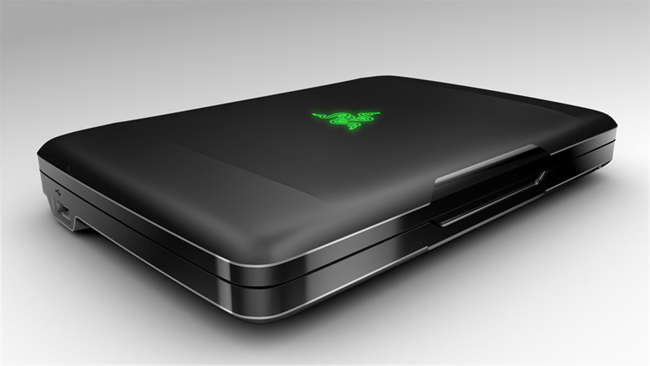
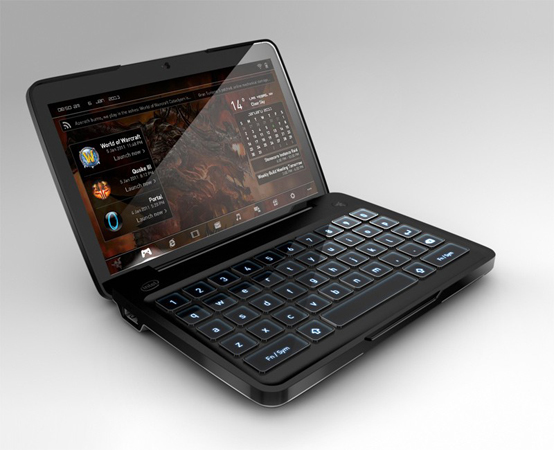
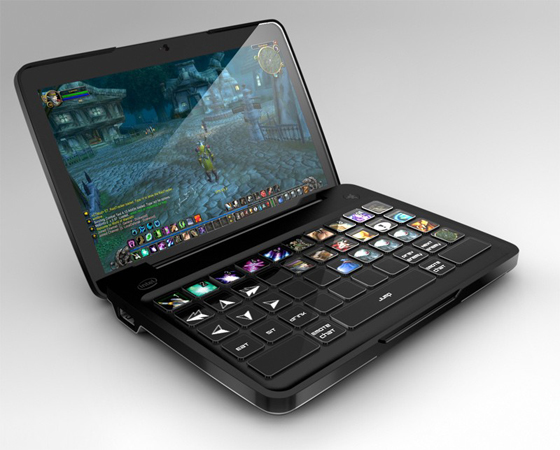
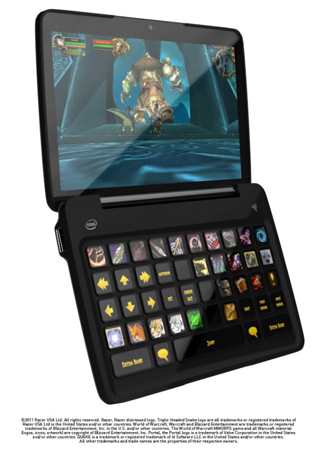
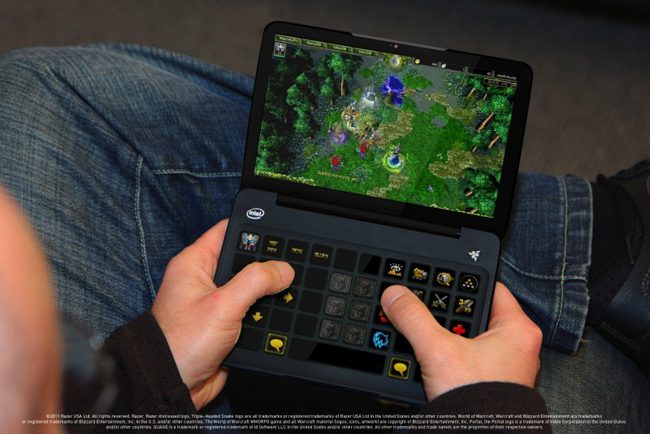
This is one slick concept machine.  Razer, the maker of high-end precision gaming products, revealed a concept mobile PC designed for gamers on the go.  The Razer Switchblade is based on the Intel Atom processor and packs an ultra-sensitive, 7-inch capacitive multitouch touchscreen (1024 x 600) and a dynamic tactile keyboard.  The keyboard is the most intriguing part of the design; key layout and configuration can be changed on-the-fly based on game content and user requirements.  For example, it can serve as a standard QWERTY keyboard as you’re browsing a website inside a browser and the next minute it can morph into a keyboard made specifically to play a game like World of Warcraft where the keys become quick access points for magical potions and spells.  So how does it all work?  Easy; just like the top half of the device, the keyboard is actually a large LCD screen in disguise with physical keys layered on top of it.  Inside the custom Razer OS skin the user can tweak the keyboard to make the keys function however they want.  Customization is left up to the user’s imagination. Sure, you can make the keys display video playback controls such as play, pause, fast-forward, etc.; but Razer is a gaming company at heart and they are hoping that gamers will find the customization options to be helpful in optimizing the way they play games on the go when a full keyboard and mouse combo are not present.

As awesome as that keyboard hopes to be, keep in mind that the Switchblade is still a portable notebook.  Razer’s custom skin can be hidden to reveal a standard copy of Windows 7.  There are also USB ports (so a mouse can theoretically be connected), a mini HDMI port, and a webcam.  Bluetooth and WiFi are also inside.  The company is still determining whether or not to pack 3G capability with it.  That’s right–this concept notebook unveiled at CES 2011 is actually coming to market in the near future.  Razer is mum on exact release date and price, but you can expect to see this portable gaming machine attempt its transformation of the mouse/keyboard paradigm sometime within the next year or so.  Full PR after the break.

[Via Engadget, here & here]

Continue reading The Razer Switchblade transforms the mouse and keyboard experience into the realm of portability

Avatar Kinect gives you more control over your Xbox doppelganger

Microsoft has announced a new Kinect-specific update for Xbox 360 owners.  Here’s out the makers explain it: “With Avatar Kinect, you can control your avatar’s facial expression, head, and arm movements. As you talk, frown, smile, or scowl, your voice and facial expressions are enacted by your avatar, bringing your avatar to life!”  In other words, the update will give you a more detailed level of control over your avatar.  Right now the Kinect captures basic movements, such as arm flails, moving side-to-side, jumping, and ducking.  With Avatar Kinect, the sensor will be able to recognize a new slate of physical actions.  Microsoft is highlighting a virtual hangout where you can meet up with up to seven friends and converse with them using your avatars.  You’ll be able to select from 15 virtual environments.  Think of it as Wii’s Mii Plaza, except this space will allow for broader interaction (detailed avatar movements performed by you, voice support).  Avatar Kinect will hit Xbox 360s later this spring.  Look after the break to see it in action.

In related Kinect news… At CES 2011 Microsoft announced that they sold 8 million Kinect sensors worldwide during its first 60 days on the market; they sold 3 million more devices than they had predicted they would during that launch window.  More news… In a spring update, Hulu Plus will be joining Netflix, expanding users’ options when it comes to TV and movie content.  In addition, the two services will be Kinect-compatible.

[Via Xbox] Continue reading Avatar Kinect gives you more control over your Xbox doppelganger