Category Archives: Technology

Meet the Move Men

To celebrate and promote the launch of PlayStation Move, Norwegian marketing agency Suddenly Oslo have dreamed up the Move Men.  Their mission?  To stalk you on Facebook, crash your party, and entice you to play a video game using the new PlayStation 3 motion peripherals.  Giz makes a good point; don’t these spherical fellas remind you of the creepy “Wii would like to play” dudes from the old Nintendo Wii commercials?

[Via Gizmodo]

Light painting with an iPad creates awesome 3D visuals in space

Light painting meets stop motion in this creative video designed by BERG and Denstsu London.  Using only a camera and multiple iPads, the team was able to capture illuminated 3D typography in real space.  I could blab about how they used multiple long exposures to create the awesome effect, but you should really just watch the video embedded above to see the final product and learn exactly how it was done.

[Via Engadget]

HDR video results in ultra realism for aspiring videographers

The fellas at Soviet Montage Productions have managed to implement the HDR process in video using two professional DSLRs.  HDR stands for High Dynamic Range, and it involves the process of taking multiple photographs (one underexposed, the other overexposed) and combining the best qualities from each to create the best image possible.  Sounds familiar?  I explained this process recently when Steve Jobs announced that iOS 4.1 would include HDR support in the iPhone’s camera software.  What Soviet Montage has so impressively done is implement the HDR photography technique with video.  Using two Canon 5D MarkIIs and beam splitter, they captured video under different exposure values and used “HDR processing tools” in post to create the visually spectacular video you see above.  The production team find HDR video extremely useful; they say it can “allow for even exposure where artificial lighting is unavailable or impractical.”  The level of detail and realism is mind-boggling, isn’t it?  I look forward to the day Jobs takes the stage to announce HDR video in iPhones; this tech must come to the masses!

[Via Engadget]

Happy 15th Anniversary, PlayStation (part deux)

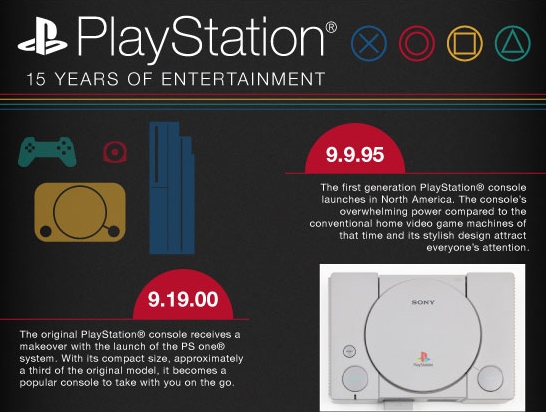
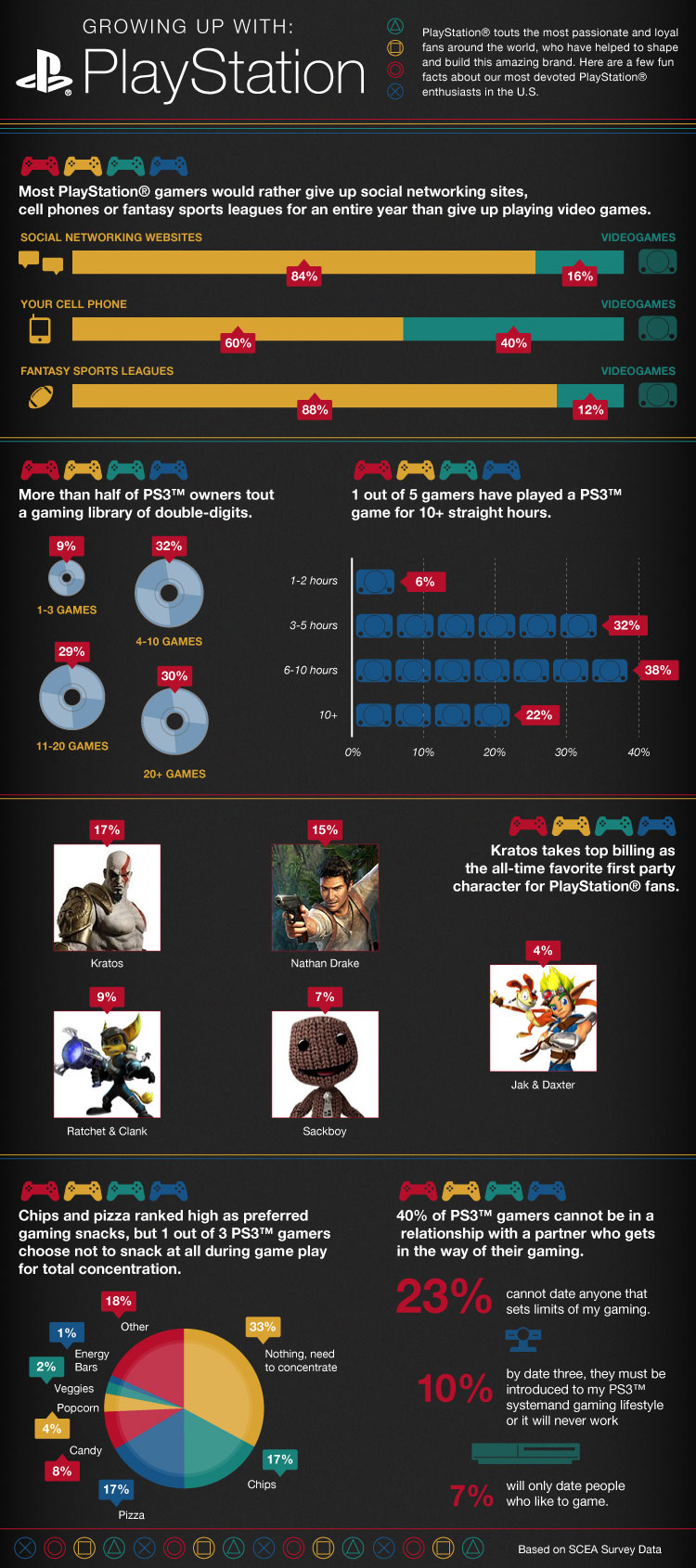
Remember way back on December 4, 2009 when we celebrated the 15th anniversary of PlayStation.  Well apparently that was celebrating the birth of the brand in Japan.  The original PlayStation console wasn’t introduced in North America until September 9, 1994.  So now we must celebrate the birth of PS in the US.  Do it by reading all these PlayStation fun facts (like did you know that seven percent of PS gamers won’t date non-gamers?) and browsing the PlayStation timeline that spans from the original console to the PlayStation Move in the gallery below.

[Via Gizmodo]

Boxee Box: Internet video on your TV coming this November for $199

Today Boxee CEO Avner Ronen announced that the Boxee Box by D-Link will cost $199 when it releases this November.  But what is the Boxee Box, you ask?  Let me tell you.

The Internet is packed with tons of video.  There’s YouTube, Hulu, Netflix, and so on.  All of these portals host all kinds of video ranging from movies, TV shows, and user-generated content.  Some of these sites feature video in high definition (up to 1080p) and they look great on our desktop monitors and laptop displays.  Boxee’s aim is to bring the abundance of video found all over the Internet from your small computer screen to your large HDTV.  For years the Boxee software has been available to download for free on the PC, Mac, and Linux and for those who own Boxee-compatible hardware (ie. Apple TV).  After years of development, Boxee is almost ready to release the Boxee Box into the wild.  The hardware is collabortively made by Boxee and D-Link and the software is developed in-house by the Boxee team.  With the Boxee Box, the company is going to bring the ultimate Boxee experience to the living room–they are going to tailor the Internet for the TV 1080p, 5.1 surround sound style (where available).

In essence, the Boxee software aggregates video content from all over the Internet into one place, making it extremely simple to find a TV show, movie, or really any kind of streaming video that is available on the web.  The Boxee Box will feature a streamlined user interface to make accessing any streaming video on the ‘Net a snap.  For example, let’s say you want to watch an episode of ABC’s Modern Family.  You can search the keyboard “Modern Family” and Boxee will scour the Internet for all legal outlets that are streaming episodes from that show.  Thanks to the Boxee Box’s built-in Mozilla-based Webkit browser with Flash & HTML5 support, you will have access to so much content you won’t know where to start.  And the best part is that the Boxee service is f-r-e-e free!  Once you pay for the hardware, there are no additional costs, no subscription fees, no nothing.  Stream free video content from the Internet to your TV.  That’s it.  (Keep in mind that you can also stream Netflix, Hulu Plus, MLB.tv, and other paid content as long as you are a paying subscriber.)

Besides streaming video content from the Internet to your TV, the Boxee Box will also support social networking and all kinds of apps.  You can attach your Facebook and Twitter accounts to the Box to keep a tab on what your friends are watching and give recommendations.  (Boxee calls this the “first “social” media center”, get it?)  In the app center, you can download Internet-streaming applications like Pandora and MLB.tv and run them straight from Boxee.  You can take things one step further by wirelessly connecting the Boxee Box to your home network, enabling you to access “virtually any file type” from your computer (think pictures, music, video) to view on your HDTV.  If you can view it on your computer, chances are you can view it on your TV if you have the Boxee Box–get it?

Let’s talk products specs. Continue reading Boxee Box: Internet video on your TV coming this November for $199

YouTube live streaming tested today and tomorrow, don’t miss it!

You’ve heard of UStream?  Well Google is looking to add similar functionality to their popular video site.  Today and tomorrow YouTube will be testing a live streaming platform with four content partners: Howcast, Next New Networks, Rocketboom and Young Hollywood.  The platform seemlessly integrates live streaming into a YouTube channel page.  All they require of selected broadcasters is a webcam or external USB/FireWire camera.  Easy peesy, right?  A “Live Comments” module sits to the right of the live video stream; this gives viewers and broadcasters the ability to communicate with one another.  Remember this is only a two-day trial only for the specified content partners; Google promises to “evaluate rolling out the platform more broadly to our partners worldwide” at an undisclosed date.  So don’t think you can broadcast live your own keyboard cat doing his thing for the world to see…yet.  Click the links provided above (or scrub through the interactive embedded YouTube TV-mabob) to catch live content before time runs out.

[Via YouTubeBlog; Engadget]

Google Instant: search “faster than the speed of type”

Today Google announced a new, innovative, groundbreaking feature for Search.  Google Instant is predictive search; in other words, when you start typing a query into the Google Search bar, you will immediately be provided with results for the most likely search given what you have already typed.  This is extremely smart and intuitive.  Here’s an example.  If you type the letter “w”, Search will instantly predict the rest of the query–in this case, “eather” appears in gray letters because Search guesses you are going to type the word “weather”.  And since Search now has a predicted word to work with, results for “weather” will appear below the Search bar.  Results include websites, images, and local weather reports–the standard fare when searching such a query.  By typing a single letter, you can glance and scroll through search results, pretty extrodinary.  There’s no need to hit enter or select the Google search button.  Google calls it “search-before-you-type.”  In addition to the predictions, Google is also touting dynamic results and scroll to search.  The former feature is one you’re used to already;  as you type a query Search displays relevant results in a drop down menu directly below the Search bar.  As you move up and down this list highlighting various queries, Search will now provide you with results pertaining to the highlighted query in real time.

Google shares some interesting facts pertaining to the amount of time that is spend using search and how Google Instant will change all that.

  • Before Google Instant, the typical searcher took more than 9 seconds to enter a search term, and we saw many examples of searches that took 30-90 seconds to type.
  • Using Google Instant can save 2-5 seconds per search.
  • If everyone uses Google Instant globally, we estimate this will save more than 3.5 billion seconds a day. That’s 11 hours saved every second.

Google Instant is currently being rolled out to Google domains in the US, UK, France, Germany, Italy, Spain and Russia.  It is compatable with the following browsers:  Chrome, Firefox, Safari and Internet Explorer 8.  “Over the coming weeks and months” Instant will become “the core search experience” to users worldwide.  If you live in the US and have a Google account, sign in and you will be granted access to Instant.  Or click the try it now button here to go for a test run.  Once Instant becomes the standard and you’re not feeling it, you can disable it in Preferences.  Instant will make its way to mobile and the Chrome URL/Google search bar in the near future.  Look after the break for a Google Instant Q&A plus some introductory videos.

[Via GoogleBlog; Google Instant] Continue reading Google Instant: search “faster than the speed of type”

Kinect finds (another) new home in 250GB Xbox 360 bundle

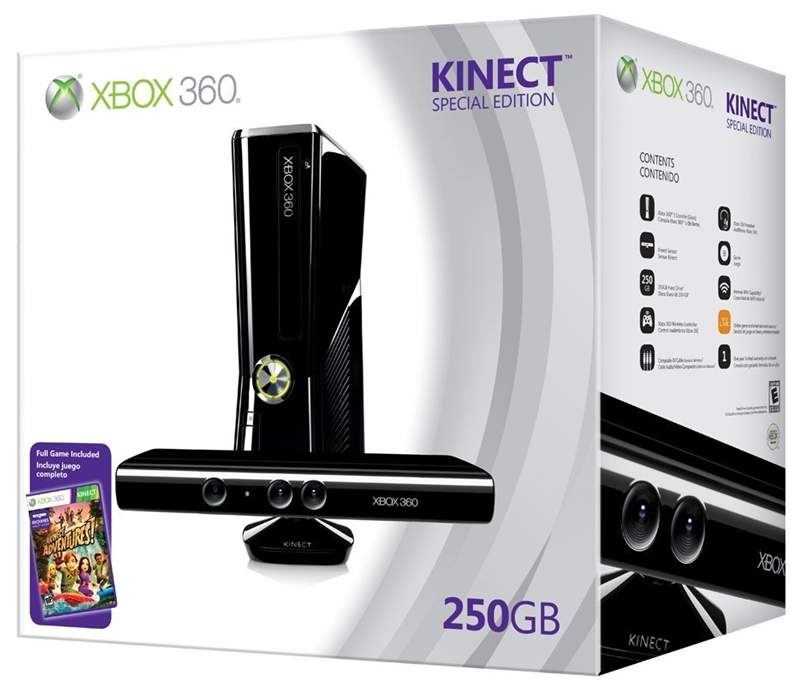
Holiday shoppers will have oodles of options to choose from when decision time comes to purchase Microsoft’s gesture-based motion tracking camera Kinect.  In addition to the standalone version ($149.99) and Xbox 360 4GB bundle ($299.99), Kinect will also ship with the higher capacity 250GB Xbox 360.  At a whopping $399.99 you will get the new “whisper quiet” shiny, black, and slim Xbox 360, Kinect, and a copy of a Kinect launch title, Kinect Adventures!.  The two bundles will ship on Kinect launch day, November 4.

[Via Engadget]

Willow Garage’s beer-fetching robot now on sale for $400k

The tinkering geniuses at Willow Garage have decided to put their beer-fetching PR2 robot on the market for a cool $400,000.  Besides grabbing you a beer and informing you when the fridge is out of stock, PR2 can also play pool, clean up your mess with a cart, plug in devices, fold towels, and open doors.  The most exciting bit about PR2 is that the personal robot is open source; with the hardware platform and over 1000 software libraries open to potential buyers, developers, and hackers, Willow Garage is supplying PR2 owners with the tools to come up with their own applications.  In fact, the company imagine a future where a Robot App Store exists.  In this exciting (frightening?) world, human owners will have the option to purchase “robot apps” for their personal smart machines in effort to make life at home and work “more productive.”  Today’s PR2 is the first major step in that direction.  I’m excited to see what sorts of applications (people with tons of money to spend) come up with.

[Via WillowGarage; Engadget]

TAT imagines the future of screen technology

A group of Swedes known as The Astonishing Tribe (or TAT) like to show of their future innovations time to time.  Their latest challenge was to imagine what the future of screens will be like.

Screen technology is now taking the next leap and the coming years imagination is the only thing stopping us. We will soon have dual screens, malleable screens, screens built into wifi connected mirrors, desks or backside of gadgets clothed with e-ink screens, tactile feedback, color screens with great contrast in sunlight, holographics/stereoscopic screens, color e-ink touch screens, or screens actually knowing where they are in relation to other screens thanks to ultrasonic emitters and microphones.

As you can see in the video above many of the screen technologies they’ve imagined are already being implemented today but in more rudamentary (and certainly less flashy) ways.  Sharing information across devices using Bluetooth and WiFi is already here (I’m thinking of Bump, the iPhone app that allows you to share contact information over Bluetooth by tapping two phones together).  Checking local news and weather on your mirror while brushing your teeth?  Yeah, that’s in the works (I hope!).

[Via TAT; Gizmodo]