Category Archives: Technology

Colbert hosts Dean Kamen and his advanced prosthetic arm

Dean Kamen is known to many as the inventor of the failed Segway transportation vehicle.  But now he’s clearly moved on to bigger and better things.  In conjunction with the Defense Department and DARPA, Kamen’s been developing an advanced prosthetic arm internally called “Luke” (named after Luke Skywalker).  Luke is being made specifically for injured U.S. troops who tragically lose their arms in battle.  It is by for the most impressive prosthetic I’ve ever seen in practical use.  See for yourself in the video above.

[Via Engadget]

Craig Ferguson hires MythBusters’ Grant Imahara to create his robot skeleton sidekick

TV’s Craig Ferguson from The Late Late Show with Craig Ferguson made a Twitter account.  Then he decided to call all of his followers his “robot skeleton army.”  Then Grant Imahara from MythBusters send Ferguson a tweet ultimatum: if Ferguson could somehow get Imahara to exceed 100,000 followers, he would help him create an actual robot skeleton sidekick for the late night show.  Since Ferguson had a massive  “robot skeleton army” it did not take long for them to help Imahara gain over 120,000 followers.  Also, Ferguson happens to be a huge Mythbusters fan so he was psyched for all this to happen.  Watch the video above to learn about Geoff Peterson, robot skeleton sidekick.

How will Geoff Peterson interact on the show?  Says Imahara: “In auto-mode setting, Craig can sit at his desk with a black box and hit any of seven red buttons for these pre-recorded responses.  In manual mode, there’s radio-control movement.  [Geoff can be put] “on a stand… and by remote-control, Craig can move [the robot’s] head, jaw, and arm.”  “[Ferguson’s] very into the design of it.  They have big plans for Geoff Peterson. Craig and the writers think they may want to send Geoff out into the world, interview people — things like that.”

You can see the recently unveiled Geoff Peterson in action on The Late Late Show with Craig Ferguson.  It airs weeknights at 12:37PM on CBS.

[Via EW]

Dr. Horrible shines in 8-bits [Update: Acts 1, 2 & 3 are up!]

Calling all Dr. Horrible’s Sing-Along Blog fans!  Graphic designer Doctor Octoroc has put together the story of Dr. Horrible in old school 8-bit fashion.  He calls it “Dr. Horrible’s Sing-Along Game” and it plays out like an old Pokeman Nintendo GameBoy game.  Says the good doctor: “All music, sound effects, graphics and animation were created by me as a tribute to Dr. Horrible (Joss Whedon) and the NES.”  This really is a must-watch if you’re into the story and music of Dr. Horrible.  It’s quite brilliant, actually.

CLICK HERE to watch Act 1.  If you have troubles viewing it there, watch it on YouTube.  DocOc promises the next two acts are on their way.  (I will alert you when they’re available to watch.)

Update: Act 2 is now up in all its 8-bit glory!  CLICK HERE to access the homepage and click “Load Game” to select Act 2.  Or watch it on YouTube.  Act 3 is in the works…

Update 2: The final act is up!  Again, CLICK HERE to access the homepage and click “Load Game” and select Act 3.  Or opt for the YouTube page.

[Via Doctoroctoroc]

Music video: Blue Roses – Doubtful (in 3D, no glasses required)

Here’s a music video that incorporates 3D effects, and you can enjoy it without wearing those pesky glasses.  LaughingSquid explains how it’s done: “Known as wiggle stereoscopy, the technique works by rapidly alternating between images shot from two cameras, slightly offset from one another.”  Though the effect is certainly visible, the jittery movements of the camera make for a rather unpleasant experience.  But it’s great to see artists taking fun creative risks!

[Via LaughingSquid; Gizmodo]

HP Slate surfaces again, this time showing off cameras, SD card slot & more

Over the weekend a tablet called iPad was released into the wild.  Taking a backseat to all the ruckus was HP, a company who knows a thing or two about the tablet game.  The HP Slate makes a brand new appearence in this video, boasting features that are noticably absent from the coveted iPad including dual cameras for Skype video chat, an SD card slot for expandable storage, and a USB port.  The Slate will run Windows 7 with a layer of HP’s TouchSmart UI laid on top.  Rumors are swirling that it’ll cost $529 and drop into customer’s hands this June, but I’ll make sure to report back when official word comes from HP.

[Via Engadget]

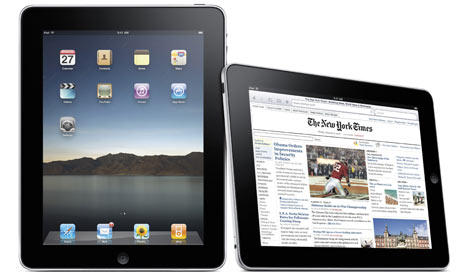
Apple sells over 300,000 iPads on launch day

On Saturday, April 3 Apple sold over 300,000 iPads.  According to the official PR, these sales include “deliveries of pre-ordered iPads to customers, deliveries to channel partners [Best Buy/Apple Authorized Resellers], and sales at Apple Retail Stores.  In addition, iPad users downloaded over 1 millon apps from the App Store and over 250,000 eBooks from the iBookstore that day.  Impressive!  Steve Jobs had this today about launch day: “It feels great to have the iPad launched into the world—it’s going to be a game changer.  iPad users, on average, downloaded more than three apps and close to one book within hours of unpacking their new iPad.”  Keep in mind that the WiFi+3G iPad does not release until “late-April.”  This second launch will certainly rack up high sales figures, too.  Can’t you feel the magic in the air?

[Via Apple]

Today is iPad Day. Want one? Here is what you need to know.

So the iPad is coming out today.  THE iPAD IS COMING OUT TODAY!  OK, calm down.  If you want one that badly, here’s what you need to know.

Where/when to buy it: (1) The iPad is available to purchase at all Apple Stores around the nation.  On launch day, Apple employees will cater to customers who preordered it first at 9AM, then start selling it to everyone else at 10AM.  Lines started forming a whole 24 hours before store opening.  But don’t worry; it’s been reported that most lines are not as deep as those found on iPhone launch day.  (2) The iPad will also be available to purchase at Besy Buy.  Word has it that the device will only be sold at Best Buys that contain the mini-Apple kiosks within them; fortunately that includes around 675 stores around the nation.  Stores will likely hand out tickets (redeemable until 3PM) at 9AM.  Your best bet is to go to an Apple Store first and save Best Buy as a backup plan.  The Apple Store will definitely receive more iPad units, and it’s been reported that Best Buy is only receiving 15 units of each model.  If queues begin, your chances of getting one are slim.  So, Apple Store first, then Best Buy.  (Apple Specialist Stores will also be getting in some iPads.  If you know if your local mall has one of these, call them up and inquire; it’s worth a shot.)

Don’t feel like going out tomorrow?: Well, that’s fine.  There is one other way to snag an iPad early in the game.  Head over to the Apple store online and order one.  The initial shipments have sold out, so if you order one today the expected ship date is April 12.  (Note that Best Buy does not offer the iPad online.)

And that’s about it.  If you’re going out to get one, good luck and have a magical day!  While you’re waiting, check out the full catelog of iPad apps, now available to view in iTunes!  I’ll be posting some of my favorites next week.

[Via Gizmodo]

iPad on TV: Colbert, Letterman, Fallon, Modern Family

With the iPad’s release one day away, the little slate of magic is making its rounds not only with tech reviewers but also on TV.


Apple fanboy Stephen Colbert chops some vegetables with it.

David Letterman licks it.

Modern Family’s Phil Dunphey really, really wants it.  (And if you have a single funny bone in your body you’ll watch the entire episode right here.)

Tonight Engadget’s Joshua Topolsky handled it with Jimmy Fallon.  And the audience was WOWED by the iBooks app.  Look after the break for part 2.

Oh, and ABC got to spend some time with the iPad and intervied a couple app developers.  Check that out after the break. Continue reading iPad on TV: Colbert, Letterman, Fallon, Modern Family

YouTube gets a facelift

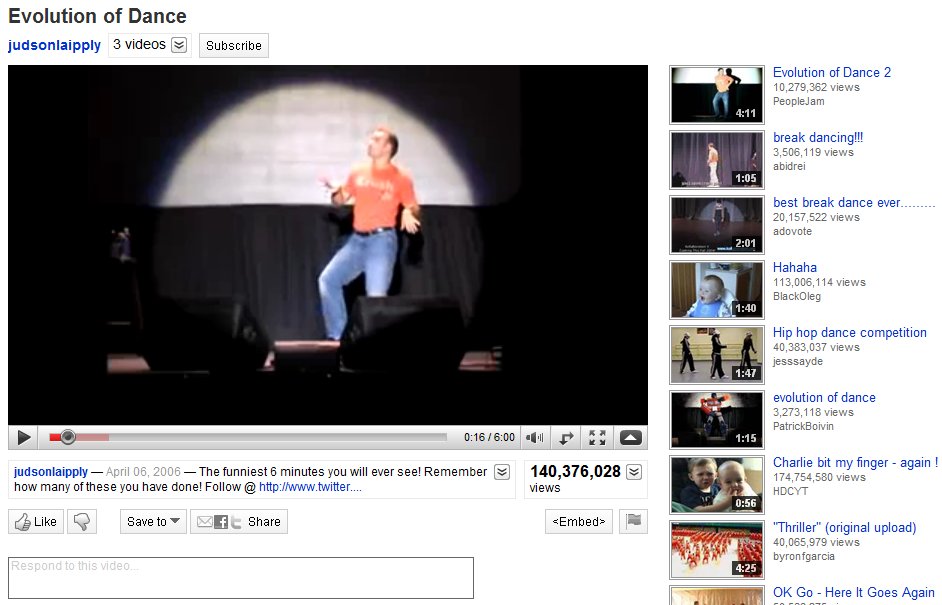
YouTube has gone ahead and given itself a makeover, pretty much making everything a whole lot more streamlined.  The overall look is stripped down and clean, making the video player the most prominent part of the screen real estate.  In the past, the user’s video information was placed in an expandable box to the right of the video.  All of that has been move and broken up into two different place.  Directly above the video player you’ll find the username link, more videos from that same user (when clicked it expands down to reveal a horizontal list of all their uploaded videos), and a subscribe button to subscribe to all of their videos.  Directly below the player you’ll find the video description that expands down to show category, tags, and more information about the video.  Next to the video description is the Views total; not only does it tell you the number of view the video has, but it can also be expanded down to share stats, links, and honors associated with the video.  Underneath the video description you’ll find a panel of buttons called the Actions Bar.  First there’s the new ratings system; a thumbs up/thumbs down model replaces the original 5 star rating system.  The Save To button allows you to favorite a video or add it to one of your playlists.  The Share button allows you to share the video via email, Facebook, Twitter, etc.  Lastly there’s the Embed and Flag buttons, to copy the video inside another website and flag a video as inappropriate, respectively.  If you happen to click on any video in a playlist, you will find the Next Up box, located in the top-right of the page.  Next Up makes for a consistent viewing experience; depending on what you search, the Next Up box will queue up videos related to your search.  And, if the auto-play option is turned on, the video player will automatically play the next video in the series as soon as the previous one is finished.  The video player itself hasn’t really changed much.  It includes the full screen and ‘make wider’ buttons, scrubbing controls with real-time time stamps, volume, and video quality options (360p to 1080p HD).  Other neat updates include Closed Captioning (which can be turned on in certain videos where you find the Annotations toggle) and a cleaned up comment section.

Overall, the YouTube facelift really enhances the user experience.  Everything is organized, tidied up, and looking better than ever.  If it weren’t for those pesky ads, the whole thing would be downright perfect.

[Via YouTubeBlog]