Category Archives: News

Today is iPad Day. Want one? Here is what you need to know.

So the iPad is coming out today.  THE iPAD IS COMING OUT TODAY!  OK, calm down.  If you want one that badly, here’s what you need to know.

Where/when to buy it: (1) The iPad is available to purchase at all Apple Stores around the nation.  On launch day, Apple employees will cater to customers who preordered it first at 9AM, then start selling it to everyone else at 10AM.  Lines started forming a whole 24 hours before store opening.  But don’t worry; it’s been reported that most lines are not as deep as those found on iPhone launch day.  (2) The iPad will also be available to purchase at Besy Buy.  Word has it that the device will only be sold at Best Buys that contain the mini-Apple kiosks within them; fortunately that includes around 675 stores around the nation.  Stores will likely hand out tickets (redeemable until 3PM) at 9AM.  Your best bet is to go to an Apple Store first and save Best Buy as a backup plan.  The Apple Store will definitely receive more iPad units, and it’s been reported that Best Buy is only receiving 15 units of each model.  If queues begin, your chances of getting one are slim.  So, Apple Store first, then Best Buy.  (Apple Specialist Stores will also be getting in some iPads.  If you know if your local mall has one of these, call them up and inquire; it’s worth a shot.)

Don’t feel like going out tomorrow?: Well, that’s fine.  There is one other way to snag an iPad early in the game.  Head over to the Apple store online and order one.  The initial shipments have sold out, so if you order one today the expected ship date is April 12.  (Note that Best Buy does not offer the iPad online.)

And that’s about it.  If you’re going out to get one, good luck and have a magical day!  While you’re waiting, check out the full catelog of iPad apps, now available to view in iTunes!  I’ll be posting some of my favorites next week.

[Via Gizmodo]
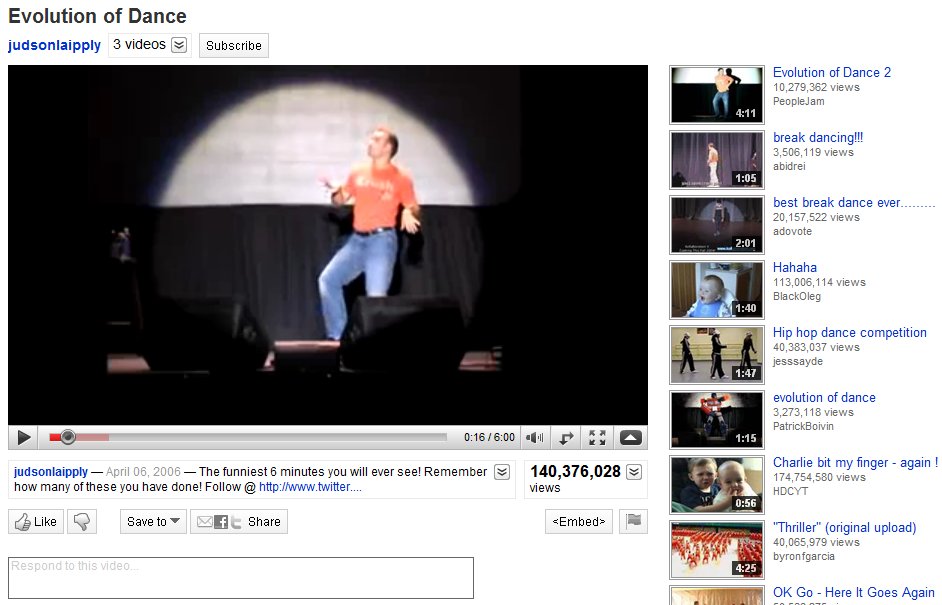
YouTube gets a facelift

YouTube has gone ahead and given itself a makeover, pretty much making everything a whole lot more streamlined.  The overall look is stripped down and clean, making the video player the most prominent part of the screen real estate.  In the past, the user’s video information was placed in an expandable box to the right of the video.  All of that has been move and broken up into two different place.  Directly above the video player you’ll find the username link, more videos from that same user (when clicked it expands down to reveal a horizontal list of all their uploaded videos), and a subscribe button to subscribe to all of their videos.  Directly below the player you’ll find the video description that expands down to show category, tags, and more information about the video.  Next to the video description is the Views total; not only does it tell you the number of view the video has, but it can also be expanded down to share stats, links, and honors associated with the video.  Underneath the video description you’ll find a panel of buttons called the Actions Bar.  First there’s the new ratings system; a thumbs up/thumbs down model replaces the original 5 star rating system.  The Save To button allows you to favorite a video or add it to one of your playlists.  The Share button allows you to share the video via email, Facebook, Twitter, etc.  Lastly there’s the Embed and Flag buttons, to copy the video inside another website and flag a video as inappropriate, respectively.  If you happen to click on any video in a playlist, you will find the Next Up box, located in the top-right of the page.  Next Up makes for a consistent viewing experience; depending on what you search, the Next Up box will queue up videos related to your search.  And, if the auto-play option is turned on, the video player will automatically play the next video in the series as soon as the previous one is finished.  The video player itself hasn’t really changed much.  It includes the full screen and ‘make wider’ buttons, scrubbing controls with real-time time stamps, volume, and video quality options (360p to 1080p HD).  Other neat updates include Closed Captioning (which can be turned on in certain videos where you find the Annotations toggle) and a cleaned up comment section.

Overall, the YouTube facelift really enhances the user experience.  Everything is organized, tidied up, and looking better than ever.  If it weren’t for those pesky ads, the whole thing would be downright perfect.

[Via YouTubeBlog]

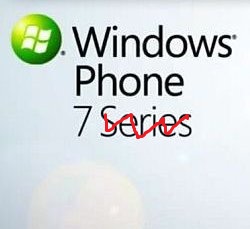
Windows Phone 7 Series drops the ‘Series’ from its name

When Microsoft first announced its mobile reboot as “Windows Phone 7 Series” there was immediate backlash due to its length and, well, it’s quite the mouthful.  After some deliberation, Microsoft decided to listen to its critics and potential customers; the new mobile OS is now branded “Windows Phone 7.”  Ahh, soo much better, isn’t it?

And while we’re still feeling the effects of April Fool’s Day, I’ll let you in a little Windows Phone 7 gag that got me and the rest of the tech community.  On April 1 PocketNow broke news that all WP7 devices would not support replaceable batteries, falling in Apple’s footsteps.  They reported: “The move is intended to promote clean and attractive hardware designs which are sure to impress. Nobody wants to see an ugly battery cover latch on a phone running something as beautiful as the Windows Phone 7 Series OS.”  But it turned out to be a hoax.  So there you go.

[Via Engadget]

Need Lost post-finale plans? Here they are.

On Sunday, May 23 the series finale of Lost called “The End” will air at 9PM on ABC (following a one hour recap special at 8PM).  When it’s over, your local news will air for about half an hour and then at 11:35PM a special edition of Jimmy Kimmel Live will air called Jimmy Kimmel Live: Aloha to Lost.  The one hour special will include an analysis of the finale, with appearences by executive producers Damon Lindelof and Carlton Cuse and interviews with a number of casts members.  Jimmy Kimmel is a huge Lost fan, so you can definitely expect him to bring the goods.  I mean, you’re going to need something to do while you’re sobbing all your sorrows away.

[Via EW-AusielloFiles]

Felicia Day fools us all with ‘Lil Guildies’

On April 1 word got out that Felicia Day’s web series The Guild was to expand its dominance to the television with a children’s program called Lil’ Guildies.  The opening segment for the animated series was put on YouTube and it received a ton of positive buzz.  Greg Aronowitz co-created it with Day, and Paul and Storm came up with the catchy theme song.  The miniature Guild members even included an embryonic version of Bladezz, since he is the youngest of the group on the web series.  That little nuggest of information should have made me roll my eyes and figure that this was an elaborate April Fool’s hoax.  But it didn’t.  And now I’m disappointed that it’s not real.  It all started at Tubefilter and it came to a screetching halt when Day screamed April Fools on Twitter.

[Via Tubefilter]

ThinkGeek’s Dharma Initiative Alarm Clock & iPad Arcade Cabinet available today!

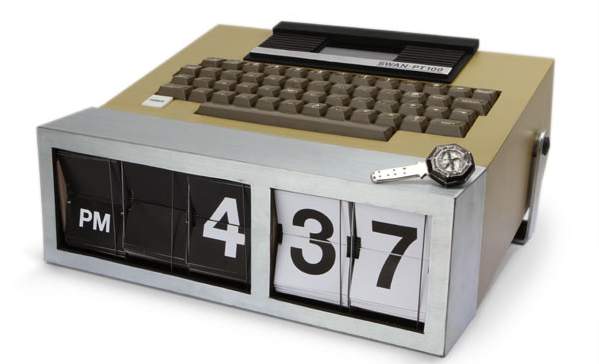
The dudes at the online shop ThinkGeek bring us the Dharma Initiative Alarm Clock.  Our Dharma Initiative Alarm Clock is conveniently programmable to go off only once every 24 hours, and at a time convenient to you.  But if you don’t get the numbers right before you see the hieroglyphs, there’s no guaranteeing what will happen.  All you gotta do is type in the numbers 4 18 15 16 23 42 to stop an electromagnetic cataclysm…er, turn off the alarm.  It requires 2 x AAA batteries and comes with a 23-year warranty, “or until your house implodes.”  Now that’s some extra motivation to get up in the morning, now ain’t it?  Only $49.99.  Check out the video below to see it in action.

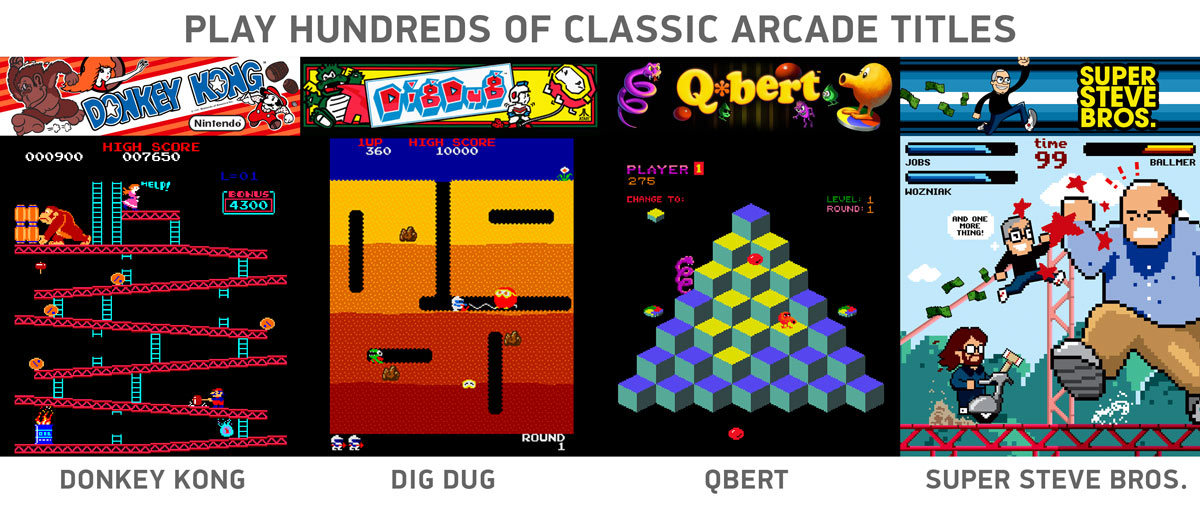
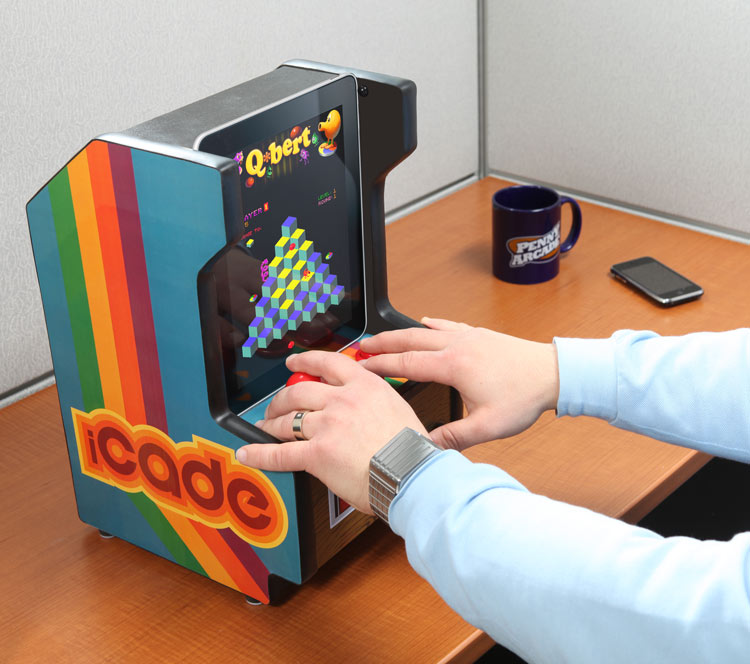
The fellas at ThinkGeek asked themselves, “How cool would it be to slide your iPad into a desktop-sized arcade cabinet and rock it old school with some Pac-Man or Space Invaders?”  Enter the iCade, an iPad arcade cabinet.  It’s simple, really.  Slide your iPad into the built-in docking cradle, plug in the included 10-watt USB power adapter for extra power, and load up a classic arcade game using the iCade app (available in the App Store on iPad launch day).  The handcrafted wooden cabinet somehow stuffs 2.1 Dolby speakers and a subwoofer!  Look in the gallery below for some game screenshots.  Future iPad buyers, get your iCade today for $149.99.

[Via ThinkGeek, here & here]

iPhone-to-iPad converter

If you’ve already got an iPhone, forget the iPad.  All you have to do is place your iPhone into the the back panel and the Pad-Dock iPhone to Tablet Converter uses a touch-screen magnifier to enlarge your iPhone screen to the exact dimensions of an iPad.  That’s all there is to it!  And unlike the iPad, this converter device will be able to make phone calls since your iPhone powers it.  Available to purchase here for a price of £89.99.

[Via IWantOneOfThose]

Starbucks intros Plenta & Micra cup sizes

Today Starbucks announced two new cup sizes to debut this fall in the US and Canada.

Plenta™ (128 fl oz) and Micra™ (2 fl oz) cups arrive in Starbucks stores this Fall. Derived from Italian word for plentiful or small, the Plenta™ delivers coffee lovers record amounts of the world’s finest coffee beverages while the Micra™ delivers a quick and satisfying morsel of goodness.

Starbucks recommends “several subsequent uses” for the cups: “…options [for the Plenta] include popcorn receptacle, rain hat, perennial planter, lampshade or yoga block.  The Micra also serves as a convenient milk dish for kittens, soft boiled egg cup or paper clip holder.”

Now there’s a size for everyone!

[Via Starbucks]

Man travels from the future to prevent the Large Hadron Collider from destroying the world

CNET UK is reports: “Eloi Cole, a strangely dressed young man, said that he had travelled back in time to prevent the LHC from destroying the world.”  If you have been keeping up with the news lately, you should know that the scientists at CERN recently had the Large Hadron Collider successfully collide particles at record force.  Their aim is to smash together atoms, create mini-black holes, and attempt to discover what exactly happed during the birth of our univierse, the Big Bang.  Ever since its inception people are worried that the Switzerland-based LHC experiment might go awry and cause a huge black hole on Earth leading to instant worldwide death.  Time-traveller Cole was at one point captured by Swiss police and explained why he came to stop the LHC from continuing its work: “Countries do not exist where I am from. The discovery of the Higgs boson led to limitless power, the elimination of poverty and Kit-Kats for everyone. It is a communist chocolate hellhole and I’m here to stop it ever happening.”  According to the latest reports, “Mr. Cole was taken to a secure mental health facility in Geneva but later disappeared from his cell. Police are baffled, but not that bothered.”

[Via CNET UK]

League of Extraordinary Gentlemen: 1988

The next installment of Alan Moore and Kevin O’Neill’s League of Extraordinary Gentlemen is here!  The narrative jumps abot 80 years into the future from  lasy year’s “Century: 1910” to League of Extraordinary Gentlemen: 1988.  Is that Dr. Emmet Brown front and center?  Synopsis, people:

When war-hero-turned-handyman Kesuke Miyagi is found drained of blood, it becomes clear that the occult gang known as the Lost Boys are targeting the only individuals that can stop them from complete domination of America. It’s the perfect case for the League of Extraordinary Gentlemen–except that their government contact, Oscar Goldman, disbanded the team in 1979 after they defeated Mr. Han’s army of the living dead.

Now, disgraced scientist Emmet Brown has to put together a new team to combat the growing threat of the Lost Boys and their leader, a newly resurrected vampire kingpin Tony Montana: Transportation specialist Jack Burton, ex-commando B.A. Baracus, tech wizard Angus MacGyver and the mysteriously powerful femme fatale known only as “Lisa.” But will Brown be able to stop the Lost Boys before time runs out?

1988 is written by Moore, but, according to ComicsAlliance, one Rusty Shackles will  fill in for illustrator O’Neill “due to the latter’s crippling addiction to “Pokemon SoulSilver”.”

[Via ComicsAlliance]

Google knows how to celebrate April Fools like no other

As I am sure many of you noticed today, Google changed its name to Topeka.  But why, you ask?  Well because the town of Topeka, Kansas changed its name to Google for the month of April.  Topeka, Kansas is one of many communities that have entered a pool of contestents to vie for a fiber-based 1 gigabit broadband network to be provided by Google sometime in the near future.  To get Google’s attention, Topeka Google’s Mayor Bill Bunten changed the town’s name and this is how Google pays it forward.  Though it’s quite a gesture of gratitude, Google has this to say: “We want to be clear that this initiative is a one-shot deal that will have no bearing on which municipalities are chosen to participate in our experimental ultra-high-speed broadband project, to which Google, Kansas has been just one of many communities to apply.”  And that’s why you see Topeka at www.google.com today.

“Google Translate for Animals” does just what you think an app with that name would do.  Check it out in action in the video above.

The latest addition to YouTube is TEXTp, a text-only mode way of watching (most) YouTube videos.  Once you flip the switch (found in the same place to select SD/HD modes) the YouTube video will playback in ASCII code, or a dumbed down jumble of letters and numbers.  It’s pretty neat!  The Lego Matrix stop motion video was made to be dressed in ASCII code, and Trololo (the Creepy La-La-La Guy) looks downright funky.

Google on the new addition: “TEXTp is the result of months of intense transcoding efforts by our engineers, who toiled for weeks to ensure that a large chunk of videos on the platform could be reduced to their most basic elements.”  “For every person who selects TEXTp and keeps it on while you watch a video, you save YouTube $1 a second, resulting in potentially billions of dollars of savings for us.”

Head over to YouTube to check out your favorites in TEXTp mode, or add append &textp=fool to the end of any video URL to enable the feature.  This better not be a one-day deal, Google!

And lastly there’s the new Google Wave wave notifications.  They’re real time, real life notifications from a human male in a lab coat who literally waves at you when your Wave account receives a new message.  To enable the new notification system, access the the drop down menu that appears in the Inbox Navigation panel.  There you can choose from four levels of loudness: Silent, Medium, Loud or Vibrate.  Now see what it’s all about in the video above.

[Via Google, here, here & here]

Twitter homepage gets a refresh

[homepage-screen.png]

Today Twitter pushed out a redesigned homepage.  It’s definitely more effective than previous implementations due to its friendly nature that will likely appeal to non-Twitter users who are looking to find out more about the community.  Trending topics and hashtags scroll along the top; what’s prominent now are the “see who’s here” and “top tweets” sections.  These sections give visitors a sense of who is adding to the conversation and what‘s being talked about in a bit more detail.  Twitter explains:

With the new design, we’re intentionally featuring more dynamic content on the front page, revealing a sample of who’s here, what folks are tweeting about, and the big topics that they’re discussing. The homepage now features a set of algorithmically-selected top tweets that automatically appear every few seconds. It also highlights a random sampling of suggested sources; hover over any of them to see a profile summary and their latest tweet. Trending topics now scroll across the page, allowing us to present a large set of trends using little page real estate. Hovering over some of these trends will show a description explaining why the keyword is (or has recently been) popular.

Now if there was only a way to get rid of all things Justin Beiber.

[Via TwitterBlog]